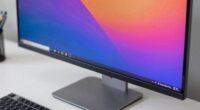
If you’re aiming to boost focus, an ultrawide monitor offers a seamless, single workspace that minimizes distractions and keeps all your tasks in view. It’s great for multitasking without switching apps or rearranging windows. Dual monitors provide dedicated screens, allowing you to organize tasks more effectively and customize ergonomic positions. Both setups have benefits, but your choice depends on your work style and preferences—keep going to discover which option suits you best.

Prime made for students and young adults
- Fast, free delivery for dorm and study essentials
- Prime Video and Amazon Music included
- Member-only deals
Key Takeaways
- Ultrawide monitors reduce distractions by providing a continuous workspace, minimizing the need to switch between windows.
- Dual monitors allow task separation, helping users focus on specific tasks with dedicated screens.
- Curved ultrawide screens can improve focus by matching natural eye movement, reducing strain.
- Dual setups offer ergonomic flexibility, enabling customized positioning for better comfort during long work sessions.
- The choice depends on personal workflow preferences—ultrawide for seamless multitasking, dual for task-specific focus.

When choosing between ultrawide and dual monitors, understanding their differences can help you make the right decision for your workspace. Both setups aim to boost your productivity and focus, but they do so in distinct ways. If multitasking efficiency is a priority, ultrawide monitors often deliver a seamless experience. With a single, expansive screen, you can easily span multiple windows, reducing the need to switch between tabs or arrange multiple displays. This continuous workspace minimizes distractions and keeps everything in view, which helps you work more efficiently. On the other hand, dual monitors offer flexibility by allowing you to dedicate separate screens to specific tasks. For example, you might have your email or chat window on one monitor and your main work on the other, creating a clear separation that can enhance focus. This setup is especially handy if you prefer organizing your workspace into distinct zones or if your workflow involves switching between different applications frequently.
Beyond multitasking, ergonomic benefits play a significant role in choosing between the two. Ultrawide monitors usually come with adjustable stands and curved designs that promote better posture. The curve can reduce neck and eye strain by matching your natural field of view, leading to a more comfortable long-term setup. Since you’re working on one large screen, you avoid the hassle of managing multiple monitor heights and angles, which can be common with dual setups. Conversely, dual monitors give you the opportunity to position screens at different heights and angles, optimizing ergonomics based on your specific needs. You can place one monitor at eye level while tilting the other for easier viewing, which might be more comfortable for some users. This flexibility allows you to customize your workspace to reduce fatigue and improve overall comfort during long work sessions. Additionally, understanding how monitor technology such as IPS or TN panels affects color accuracy and response times can further help tailor your setup for specific tasks.
In the end, your choice depends on how you prefer to work and what your ergonomic needs are. Ultrawide monitors excel in creating a unified, immersive workspace that can streamline multitasking and reduce physical strain. They’re particularly advantageous if you want a clean, minimalist setup with fewer cables and a sleek look. Dual monitors might appeal more if you value customization and the ability to assign different tasks to separate screens. They also provide a more adaptable ergonomic arrangement, which can be *vital* during extended work hours. Both options have their benefits, but understanding how they affect multitasking efficiency and ergonomic comfort will guide you toward the setup that best supports your focus and productivity.
ultrawide curved monitor 34 inch
As an affiliate, we earn on qualifying purchases.
As an affiliate, we earn on qualifying purchases.
Frequently Asked Questions
How Does Screen Curvature Affect Productivity?
Screen curvature can boost your productivity by providing a more immersive viewing experience, reducing the need to move your head and eyes excessively. However, it might cause visual distortion for some users, making it harder to focus or read details. Additionally, ergonomic concerns could arise if the curve doesn’t match your workspace setup, leading to discomfort over time. Choose a curvature that aligns well with your natural viewing angle for ideal focus.
Are Ultrawide Monitors More Cost-Effective Than Dual Setups?
Sure, ultrawide monitors are more cost-effective than dual setups—if you ignore the hefty price tag and fancy features. When you do a real cost comparison, budget considerations show ultrawides often cost more upfront. So, if you’re trying to save, dual monitors might be your better bet. But hey, if you love that seamless, panoramic view, maybe splurging is worth it. Just don’t pretend it’s cheaper.
Can Dual Monitors Cause More Desk Clutter?
Yes, dual monitors can cause more desk clutter, especially if cable management isn’t a priority. You might find yourself dealing with multiple power cords, HDMI or DisplayPort cables, and additional accessories, making desk organization a challenge. To keep your workspace tidy, use cable clips, sleeves, or under-desk cable trays. Proper cable management helps reduce clutter, improves focus, and creates a cleaner, more efficient setup for your dual monitor system.
What Are the Best Resolutions for Ultrawide Vs Dual Monitors?
You might find that the best resolutions for ultrawide monitors are around 3440×1440, with an aspect ratio of 21:9, giving you immersive visuals. For dual monitors, 1920×1080 or 2560×1440 per screen works well, creating a seamless workflow. Keep an eye on refresh rates—higher rates like 120Hz or 144Hz enhance smoothness and focus. The right resolution and aspect ratio can unexpectedly boost your productivity and immersion.
How Do These Setups Impact Gaming Performance and Experience?
Your gaming performance and experience improve with ultrawide monitors because they offer immersive gameplay and better multitasking efficiency. You’ll notice smoother visuals and a wider field of view that pulls you into the action. Dual monitors can also boost multitasking, but they might distract you during intense gaming sessions. Overall, ultrawide setups enhance immersion, making gameplay more engaging, while dual monitors excel at managing multiple tasks simultaneously.
As an affiliate, we earn on qualifying purchases.
Conclusion
Ultimately, whether you choose ultrawide or dual monitors depends on your workflow and preferences. An ultrawide might make you feel like you’re piloting the Millennium Falcon through a galaxy of tasks, offering seamless multitasking. Dual monitors give you flexibility, like having a trusty sidekick. Whichever you pick, remember that the right setup can boost your focus and productivity—just don’t get lost in the tech like a modern-day Daedalus wandering his labyrinth.
As an affiliate, we earn on qualifying purchases.
As an affiliate, we earn on qualifying purchases.
Columbus Day / Indigenous Peoples' Day Picks
long weekend sales
As an affiliate, we earn on qualifying purchases.