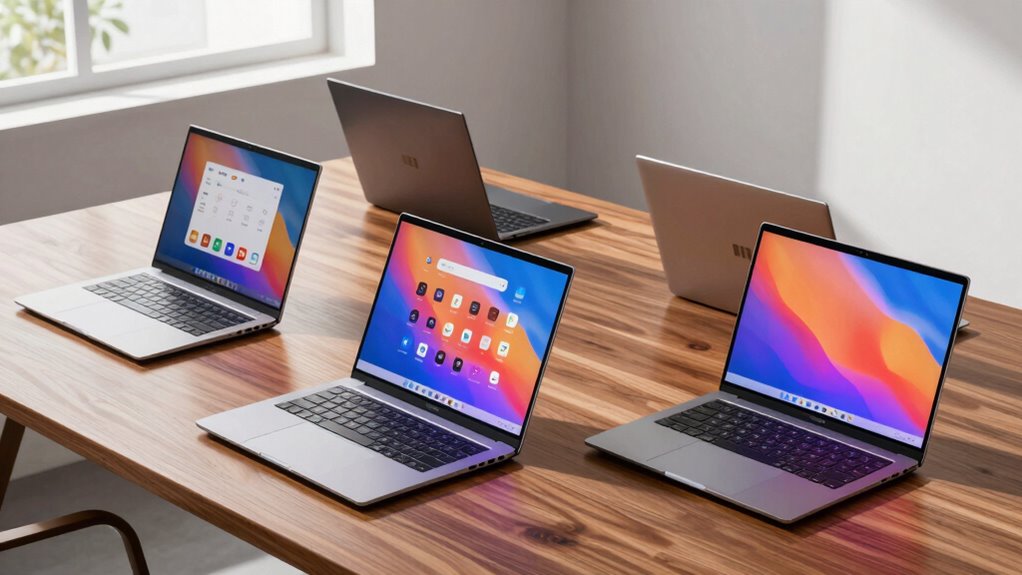

For a 2-in-1 laptop under $1,000, I’d start with the Dell Latitude 7420: its Core i5, 16GB RAM, and 512GB SSD make it the strongest all-around choice here for work and multitasking. The 12-inch 2K Windows models offer a sharper, more portable touch experience, while the Lenovo Chromebook 300e suits buyers who mainly need a simple browser-based device. The main tradeoffs are processing power versus portability, Windows versatility versus Chromebook simplicity, and capable memory versus limited storage on entry-level models. Several listings have older or modest processors, so a convertible design does not automatically mean strong performance. Read on for the full breakdown and the best fit for your needs.

Prime made for students and young adults
- Fast, free delivery for dorm and study essentials
- Prime Video and Amazon Music included
- Member-only deals
Key Takeaways
- The Dell Latitude 7420 is the clearest all-around pick because its Core i5 processor, 16GB RAM, and 512GB SSD give it more headroom for demanding everyday work than the lower-powered options.
- The three 12-inch 2K Windows laptops share a useful middle ground: sharper displays and 12GB RAM, with differences in processor and storage that matter more than their similar convertible format.
- Chromebooks trade software flexibility for simpler everyday use. The Lenovo 300e and Dell Chromebook 11 have only 4GB RAM and small eMMC storage, so they fit browser-first tasks better than large local projects.
- The 15.6-inch Yoga is the screen-space pick, not the portability pick. Its larger display may help with documents and video, but the AMD A9 processor is a weaker fit for demanding multitasking than the Latitude.
- Check the exact configuration and condition before buying. Several options are renewed, and the supplied listings do not specify details such as stylus inclusion or battery condition.
| 15.6-inch Yoga 2-in-1 Touchscreen Laptop with AMD A9 Processor, 8GB RAM, 256GB SSD, Windows 11 | 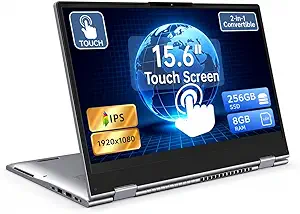 | Best Large-Screen Pick | Display: 15.6-inch Full HD IPS touchscreen, 1920 x 1080 | Processor: AMD A9, up to 3.2GHz | Memory: 8GB DDR3 SDRAM | VIEW ON AMAZON | See Our Full Breakdown |
| Tunhail 10.1-inch 2-in-1 Laptop with 12GB RAM, 256GB SSD, and 360° Flip Touchscreen |  | Best Compact Convertible | Display: 10.1-inch touchscreen, 800 x 1280 | Processor: Intel Core m3-8100Y, up to 3.40GHz | Memory: 12GB DDR3 | VIEW ON AMAZON | See Our Full Breakdown |
| Dell Latitude 7420 2-in-1 Business Laptop, 14″ FHD Touchscreen, Core i5-1145G7, 16GB RAM, 512GB SSD, Windows 11 Pro |  | Best for Productivity | Display: 14-inch FHD touchscreen, 1920 x 1080 | Processor: Intel Core i5-1145G7, 2.6GHz up to 4.4GHz | Memory: 16GB DDR4 | VIEW ON AMAZON | See Our Full Breakdown |
| 2-in-1 Laptop Tablet with 12″ 2K Touchscreen, Intel N5095, 12GB RAM, 512GB SSD |  | Best Lightweight Detachable | Display: 12-inch IPS touchscreen, 2000 x 1200 | Processor: Intel N5095, 4-core, up to 2.9GHz | Memory: 12GB | VIEW ON AMAZON | See Our Full Breakdown |
| 2-in-1 Laptop/Tablet with 12-Inch 2K Touchscreen, Intel Pentium Gold 6500Y, 12GB RAM, 256GB SSD, Windows 11 |  | Best Compact 2K Value | Display: 12-inch 2K IPS touchscreen | Processor: Intel Pentium Gold 6500Y | Memory: 12GB | VIEW ON AMAZON | See Our Full Breakdown |
| Lenovo Chromebook 300e 2nd Gen 2-in-1 11.6″ Touch, 4GB RAM, 32GB eMMC, Black (Renewed) |  | Best for School Basics | Display: 11.6-inch IPS touchscreen, 1366 x 768 | Processor: Intel Celeron N4000 dual-core, 1.1GHz up to 2.6GHz | Memory: 4GB DDR4 | VIEW ON AMAZON | See Our Full Breakdown |
| 2-in-1 Laptop/Tablet (2026) with Windows 11, 12″ 2K Touchscreen, 12GB RAM, 256GB SSD, Intel Pentium Gold 6500Y |  | Best Windows Screen and Memory | Display: 12-inch 2K IPS touchscreen | Processor: Intel Pentium Gold 6500Y | Memory: 12GB | VIEW ON AMAZON | See Our Full Breakdown |
| HP 14 2-in-1 Chromebook (Renewed) – 14″ FHD IPS Touchscreen, Intel N100, 4GB RAM, 64GB Storage |  | Best for a Larger Chromebook Display | Display: 14-inch FHD IPS touchscreen | Processor: Intel N100 quad-core, up to 3.40GHz | Memory: 4GB DDR5 | VIEW ON AMAZON | See Our Full Breakdown |
| Dell Chromebook 11 3100 – 11.6″ 2-in-1 Touchscreen Laptop (Renewed) |  | Best Compact Renewed Pick | Display: 11.6-inch IPS touchscreen, 1366 x 768 | Processor: Intel Celeron N4020 dual-core, 2.4GHz base up to 2.8GHz | Memory: 4GB LPDDR4 | VIEW ON AMAZON | See Our Full Breakdown |
| in 1 laptop under 1000 | Display | Processor | Memory | Storage |
|---|---|---|---|---|
| 15.6-inch Yoga 2-in-1 Touchscr | 15.6-inch Full HD IPS touchscreen, 1920 x 1080 | AMD A9, up to 3.2GHz | 8GB DDR3 SDRAM | 256GB SSD; expandable with up to a 1TB TF card |
| Tunhail 10.1-inch 2-in-1 Lapto | 10.1-inch touchscreen, 800 x 1280 | Intel Core m3-8100Y, up to 3.40GHz | 12GB DDR3 | 256GB SSD |
| Dell Latitude 7420 2-in-1 Busi | 14-inch FHD touchscreen, 1920 x 1080 | Intel Core i5-1145G7, 2.6GHz up to 4.4GHz | 16GB DDR4 | 512GB SSD |
| 2-in-1 Laptop Tablet with 12" | 12-inch IPS touchscreen, 2000 x 1200 | Intel N5095, 4-core, up to 2.9GHz | 12GB | 512GB SSD |
| 2-in-1 Laptop/Tablet with 12-I | 12-inch 2K IPS touchscreen | Intel Pentium Gold 6500Y | 12GB | 256GB SSD |
| Lenovo Chromebook 300e 2nd Gen | 11.6-inch IPS touchscreen, 1366 x 768 | Intel Celeron N4000 dual-core, 1.1GHz up to 2.6GHz | 4GB DDR4 | 32GB eMMC |
| 2-in-1 Laptop/Tablet | 12-inch 2K IPS touchscreen | Intel Pentium Gold 6500Y | 12GB | 256GB SSD |
| HP 14 2-in-1 Chromebook | 14-inch FHD IPS touchscreen | Intel N100 quad-core, up to 3.40GHz | 4GB DDR5 | 64GB |
| Dell Chromebook 11 3100 | 11.6-inch IPS touchscreen, 1366 x 768 | Intel Celeron N4020 dual-core, 2.4GHz base up to 2.8GHz | 4GB LPDDR4 | 32GB flash memory |
More Details on Our Top Picks
15.6-inch Yoga 2-in-1 Touchscreen Laptop with AMD A9 Processor, 8GB RAM, 256GB SSD, Windows 11
The 15.6-inch Full HD IPS touchscreen makes this Yoga the clearest choice here for buyers who want a roomy display for documents, video, and side-by-side windows. Its 360-degree hinge supports laptop and tablet-style use, while the 256GB SSD and 8GB of memory suit everyday browsing, study, and office tasks. Compared with the compact Tunhail 10.1-inch 2-in-1, this model offers substantially more screen space and a standard 1920 x 1080 resolution, but it is less appealing for commuting or handheld tablet use. The AMD A9 is an older, entry-level processor, so demanding editing and heavy multitasking are not its strength. I would also weigh the missing weight and battery-life details before choosing it as a frequently carried device.
Pros:- 15.6-inch Full HD IPS touchscreen gives more working room than the compact models
- 360-degree hinge supports laptop and tablet-style positioning
- 256GB SSD and 8GB RAM fit common study and office workloads
- USB-C, two USB 3.0 ports, HDMI, and micro TF slot offer useful connectivity
Cons:- AMD A9 processor is a poor fit for intensive creative work or demanding multitasking
- Weight and battery-life details are not provided, making portability harder to judge
- DDR3 memory is older than the DDR4 configuration in the Dell Latitude 7420
Best for: Home-based students and office users who want a large Full HD touchscreen for everyday work and media.
Not ideal for: Frequent commuters or users running demanding creative software, because the weight is unspecified and the AMD A9 is entry-level.
- Display:15.6-inch Full HD IPS touchscreen, 1920 x 1080
- Processor:AMD A9, up to 3.2GHz
- Memory:8GB DDR3 SDRAM
- Storage:256GB SSD; expandable with up to a 1TB TF card
- Graphics:Radeon R5
- Operating system:Windows 11
- Ports:1 USB-C, 2 USB 3.0, HDMI, audio jack, micro TF slot
- Wireless:Wi-Fi 802.11ac and Bluetooth
Our verdict“Choose this Yoga if a large Full HD convertible screen matters more to you than portability or processor speed.”
Tunhail 10.1-inch 2-in-1 Laptop with 12GB RAM, 256GB SSD, and 360° Flip Touchscreen
The 10.1-inch 360-degree touchscreen gives this Tunhail a distinctly compact role: it is easier to fit into a small bag than the 15.6-inch Yoga, and its hinge lets it serve as a little laptop or touch-first device. Its 12GB RAM is generous for basic multitasking, and the backlit keyboard is useful for typing in dim rooms. The tradeoff is the display: the listed 800 x 1280 resolution falls well short of the Yoga’s Full HD panel and the 2K screens on the detachable 12-inch models. The Core m3-8100Y and DDR3 memory also set limits for heavier workloads. I’d pick this for portability and simple tasks, not for extended spreadsheet work, detailed media viewing, or intensive creative apps.
Pros:- Compact 10.1-inch touchscreen is easier to carry than the 15.6-inch Yoga
- 360-degree hinge provides flexible laptop and tablet-style positioning
- 12GB RAM and 256GB SSD support everyday multitasking and file storage
- Backlit keyboard and USB-C, USB-A, and Micro-HDMI add practical convenience
Cons:- 800 x 1280 resolution is lower than the Full HD and 2K displays in this group
- Core m3-8100Y and DDR3 memory are not suited to heavy creative workloads
- Small screen and keyboard can feel cramped for long work sessions
Best for: Students and commuters who prioritize a compact Windows convertible for notes, web research, and light typing.
Not ideal for: Buyers who need a sharp, roomy screen or sustained performance for demanding applications.
- Display:10.1-inch touchscreen, 800 x 1280
- Processor:Intel Core m3-8100Y, up to 3.40GHz
- Memory:12GB DDR3
- Storage:256GB SSD
- Operating system:Windows 11
- Convertible design:360-degree flip hinge
- Ports:USB-C, USB-A 3.0, Micro-HDMI, headphone jack
- Wireless:Wi-Fi 5 and Bluetooth 5.0
Our verdict“Pick the Tunhail if you want a small, hinge-based Windows convertible and can accept its low-resolution display.”
Dell Latitude 7420 2-in-1 Business Laptop, 14″ FHD Touchscreen, Core i5-1145G7, 16GB RAM, 512GB SSD, Windows 11 Pro
Among these picks, the refurbished Dell Latitude 7420 has the strongest productivity-oriented specification: its 11th-generation Core i5, 16GB DDR4 RAM, and 512GB SSD give it more headroom for simultaneous office apps and larger local files than the AMD A9 Yoga or the entry-level N5095 detachable. The 14-inch Full HD touchscreen is a more balanced work surface than the Tunhail’s 10.1-inch panel, while still being more compact than the Yoga’s 15.6-inch display. Windows 11 Pro also suits buyers who need its business-focused feature set. The main caveat is its refurbished condition, which can mean cosmetic wear or less predictable support than a new device. Battery life is not specified, so I would not choose it for all-day mobile work without checking the listing details.
Pros:- Core i5-1145G7 offers more processing headroom than the AMD A9 and Intel N5095 options
- 16GB DDR4 RAM supports heavier multitasking than the 8GB Yoga
- 512GB SSD provides twice the listed capacity of the 256GB models
- 14-inch Full HD touchscreen balances usable workspace with a smaller footprint than the Yoga
Cons:- Refurbished condition may involve cosmetic wear or less predictable support
- Battery life is not specified
- No port or weight details are provided in the supplied product data
Best for: Remote workers and business users who want stronger multitasking, Windows 11 Pro, and a conventional Full HD convertible display.
Not ideal for: Buyers who require a new device, clearly specified battery endurance, or the lightest tablet-style setup.
- Display:14-inch FHD touchscreen, 1920 x 1080
- Processor:Intel Core i5-1145G7, 2.6GHz up to 4.4GHz
- Memory:16GB DDR4
- Storage:512GB SSD
- Operating system:Windows 11 Pro
- Form factor:2-in-1 convertible
- Condition:Refurbished
Our verdict“Choose the Latitude if work performance and storage take priority over new-device condition and known battery life.”
2-in-1 Laptop Tablet with 12″ 2K Touchscreen, Intel N5095, 12GB RAM, 512GB SSD
This detachable stands out for buyers who want a tablet-first device without giving up a relatively high-resolution screen: its 12-inch 2000 x 1200 IPS panel, magnetic keyboard, and 0.64kg listed weight make it more portable than the 15.6-inch Yoga and more visually detailed than the Tunhail. The 512GB SSD also gives it the same listed capacity as the Dell Latitude 7420, though its Intel N5095 is a much more modest processor than the Dell’s Core i5. That difference matters if work involves demanding applications or frequent heavy multitasking. The stated battery life is up to eight hours of video playback, a useful guide but not a promise for every workload. I’d choose it for reading, study, and everyday travel rather than processor-heavy professional tasks.
Pros:- 0.64kg listed weight makes it the most clearly portable option in this group
- 12-inch 2000 x 1200 IPS touchscreen offers more detail than the Tunhail display
- 512GB SSD matches the Latitude’s listed capacity
- Detachable magnetic keyboard supports tablet-first use and laptop-style typing
Cons:- Intel N5095 is less suited to demanding workloads than the Dell Latitude’s Core i5
- Battery life is stated as up to eight hours of video playback, which may not match heavier use
- A 12-inch display offers less workspace than the Yoga’s 15.6-inch screen
Best for: Traveling students and readers who want a lightweight detachable with a sharp 12-inch screen and ample listed storage.
Not ideal for: Professionals running processor-intensive software or buyers who need battery endurance beyond the stated video-playback estimate.
- Display:12-inch IPS touchscreen, 2000 x 1200
- Processor:Intel N5095, 4-core, up to 2.9GHz
- Memory:12GB
- Storage:512GB SSD
- Battery:4300mAh; up to 8 hours of video playback
- Weight:0.64kg
- Operating system:Windows 11 Home
- Connectivity:Dual-band Wi-Fi, Bluetooth 5.0, dual Type-C, 3.5mm audio jack
Our verdict“Choose this detachable for portable study and media use, but pick the Dell Latitude for more demanding work.”
2-in-1 Laptop/Tablet with 12-Inch 2K Touchscreen, Intel Pentium Gold 6500Y, 12GB RAM, 256GB SSD, Windows 11
This 12-inch detachable is a compact way to get a 2K IPS touchscreen and a magnetic keyboard in one Windows device. Its 0.64kg listed weight makes it appealing for carrying between classes or using as a tablet, while 12GB RAM supports ordinary multitasking better than the 8GB Yoga. Compared with the N5095 detachable, it keeps the same screen size, resolution, memory, and stated battery capacity, but halves the listed SSD storage from 512GB to 256GB. The Pentium Gold 6500Y is best treated as an everyday-use processor, not a workstation chip; the Latitude 7420 is a stronger match for heavier productivity. Its small display is also less comfortable for long sessions with multiple windows. I’d favor this model when portability and screen quality matter more than storage or processing headroom.
Pros:- 12-inch 2K IPS touchscreen provides a sharper viewing experience than the Tunhail
- 0.64kg listed weight and detachable keyboard suit portable tablet use
- 12GB RAM supports routine multitasking
- Dual Type-C ports and Bluetooth 5.0 provide flexible connectivity
Cons:- 256GB SSD is half the listed capacity of the N5095 detachable
- Pentium Gold 6500Y is not a strong fit for intensive creative or professional workloads
- 12-inch display limits workspace compared with the 14-inch Dell and 15.6-inch Yoga
Best for: Students and frequent travelers who want a lightweight 2K Windows tablet for notes, browsing, and routine documents.
Not ideal for: Users with large local media libraries, demanding software, or a preference for a larger work screen.
- Display:12-inch 2K IPS touchscreen
- Processor:Intel Pentium Gold 6500Y
- Memory:12GB
- Storage:256GB SSD
- Battery:4300mAh; up to 8 hours
- Weight:0.64kg
- Operating system:Windows 11 Home
- Connectivity:Wi-Fi 5, Bluetooth 5.0, dual Type-C ports, 3.5mm audio jack
Our verdict“Pick this compact model if a portable 2K screen matters more than the extra storage and processing capacity of the larger-workload options.”
Lenovo Chromebook 300e 2nd Gen 2-in-1 11.6″ Touch, 4GB RAM, 32GB eMMC, Black (Renewed)
Small, school-friendly, and Chrome OS-simple, the Lenovo Chromebook 300e suits students who mainly use browser-based lessons, documents, and video calls. Its touchscreen and convertible design make it more flexible than a basic clamshell, while the stated up to 10-hour battery life can cover a school day away from an outlet. Compared with the HP 14 2-in-1 Chromebook, it has a smaller, lower-resolution screen and less storage, so it is less comfortable for split-screen work or media. The Celeron N4000 and 4GB of RAM also limit heavier multitasking, and 32GB leaves little room for offline files. This renewed Lenovo makes the most sense for lightweight coursework, not as a do-everything laptop.
Pros:- Convertible IPS touchscreen supports laptop and tablet-style use.
- Battery life is listed at up to 10 hours.
- Chrome OS fits browser-focused schoolwork and everyday web tasks.
- USB-C and USB-A provide options for accessories and charging.
Cons:- 32GB eMMC storage leaves limited room for offline files and apps.
- 4GB RAM and the Celeron N4000 can constrain multitasking.
- The 1366 x 768 display is less spacious and sharp than the HP 14’s Full HD panel.
Best for: Students who need a compact convertible for web-based classes, reading, and simple assignments.
Not ideal for: Buyers who keep large files locally, run demanding apps, or want a roomy Full HD screen.
- Display:11.6-inch IPS touchscreen, 1366 x 768
- Processor:Intel Celeron N4000 dual-core, 1.1GHz up to 2.6GHz
- Memory:4GB DDR4
- Storage:32GB eMMC
- Operating system:Chrome OS
- Battery life:Up to 10 hours
- Connectivity:USB-C, USB-A, Wi-Fi, Bluetooth
- Condition:Renewed
Our verdict“Choose the Lenovo for basic schoolwork and all-day portability, but skip it if you need ample storage or stronger multitasking.”
2-in-1 Laptop/Tablet (2026) with Windows 11, 12″ 2K Touchscreen, 12GB RAM, 256GB SSD, Intel Pentium Gold 6500Y
A sharper display and more memory set this Windows 11 convertible apart from the Chrome OS options here. The 12-inch 2K touchscreen gives text and images more detail than the 1366 x 768 panels on the Lenovo Chromebook 300e and Dell Chromebook 11 3100, while 12GB RAM and a 256GB SSD offer more breathing room for multitasking and files. Its 1.4-pound weight is especially appealing for commuters carrying a device between classes or meetings. The tradeoff is the Pentium Gold 6500Y: it is still an entry-level processor, not a fit for intensive creative work. Battery life is not specified, so I would not choose it based on unplugged endurance. It is the strongest fit here for buyers who need Windows apps in a portable form.
Pros:- 12-inch 2K touchscreen offers more detail than the HD Chromebook displays.
- 12GB RAM supports more simultaneous work than the 4GB alternatives.
- 256GB SSD provides more local storage than the 32GB or 64GB Chromebook models.
- At 1.4 pounds, it is exceptionally light for carrying around.
Cons:- Pentium Gold 6500Y is not suited to demanding editing or intensive workloads.
- Battery life is not provided in the product details.
- Its 256GB SSD is less capacious than larger-storage options in the broader roundup.
Best for: Students and mobile workers who need Windows software, a high-resolution touchscreen, and more memory than the Chromebooks provide.
Not ideal for: Buyers doing processor-heavy creative work or those who need confirmed long battery life.
- Display:12-inch 2K IPS touchscreen
- Processor:Intel Pentium Gold 6500Y
- Memory:12GB
- Storage:256GB SSD
- Operating system:Windows 11
- Weight:1.4 pounds
- Thickness:0.36 inches
- Connectivity:USB-C, Micro HDMI, Bluetooth 5.0, Wi-Fi
Our verdict“Pick this model if Windows compatibility, a detailed screen, and low carry weight matter more than high-end processing or known battery endurance.”
HP 14 2-in-1 Chromebook (Renewed) – 14″ FHD IPS Touchscreen, Intel N100, 4GB RAM, 64GB Storage
The roomiest Chromebook screen in this group is the HP 14’s main advantage. Its 14-inch Full HD IPS touchscreen gives documents, browser tabs, and video more usable space than the 11.6-inch Lenovo and Dell convertibles. The four-core Intel N100 is also a newer, more capable basic-task choice than the Celeron N4000 in the Lenovo Chromebook 300e, though the HP’s 4GB RAM still puts a ceiling on heavy multitasking. Wi-Fi 6 is a useful modern connection option, but it cannot offset the limited 64GB storage if you keep lots of files offline. This renewed model is best for home or classroom use where screen comfort matters more than compact size; buyers wanting Windows software should look to the 12-inch Windows 11 convertible instead.
Pros:- 14-inch Full HD IPS touchscreen gives more workspace than the 11.6-inch Chromebook options.
- Four-core Intel N100 is a stronger basic-task proposition than the Lenovo’s Celeron N4000.
- 360-degree hinge supports laptop and tablet-style use.
- Wi-Fi 6 and Bluetooth 5 provide current wireless connectivity.
Cons:- 4GB RAM can limit demanding multitasking.
- 64GB storage is restrictive for large offline libraries.
- Renewed condition and 720p webcam may not suit buyers seeking a new device or sharper video calls.
Best for: Chromebook users who want a larger Full HD touchscreen for schoolwork, browsing, and video at home or in class.
Not ideal for: Frequent travelers prioritizing a small device, or buyers who need Windows apps, substantial local storage, or extensive multitasking.
- Display:14-inch FHD IPS touchscreen
- Processor:Intel N100 quad-core, up to 3.40GHz
- Memory:4GB DDR5
- Storage:64GB
- Operating system:Chrome OS
- Connectivity:USB-C, USB-A, Wi-Fi 6, Bluetooth 5
- Webcam:720p with dual-array microphones
- Condition:Renewed
Our verdict“Choose the HP for a larger, sharper Chromebook display and everyday browsing, not for extensive offline storage or demanding workloads.”
Dell Chromebook 11 3100 – 11.6″ 2-in-1 Touchscreen Laptop (Renewed)
At 3.1 pounds, the Dell Chromebook 11 3100 is the most portable of the two small renewed Chromebooks with stated weights. Its 11.6-inch IPS touchscreen and convertible format handle basic browsing and school tasks, while USB-C, DisplayPort, and Bluetooth 5 add useful connection flexibility. Against the Lenovo Chromebook 300e, the Dell has a newer Celeron N4020 and a lower listed weight, but its battery-life details are not supplied; Lenovo lists up to 10 hours. Both have just 4GB RAM and 32GB storage, so neither is built for demanding multitasking or a large offline library. The HD screen is also less crisp than the HP 14’s Full HD panel. I’d favor this Dell when carry weight matters most and Chromebook basics are enough.
Pros:- 3.1-pound weight makes it lighter than the listed Lenovo Chromebook 300e.
- Convertible 11.6-inch IPS touchscreen supports tablet-style use.
- USB-C, DisplayPort, and Bluetooth 5 offer useful connectivity.
- Celeron N4020 is a newer processor generation than the Lenovo’s N4000.
Cons:- 32GB storage can require cloud use or external storage.
- 4GB RAM and the entry-level processor limit heavy multitasking.
- 1366 x 768 resolution is less sharp than the HP 14’s Full HD screen, and battery life is unspecified.
Best for: Students and commuters who want a lightweight renewed Chromebook for web-based tasks and occasional tablet use.
Not ideal for: Buyers who need a Full HD display, ample local storage, confirmed all-day battery life, or performance for demanding apps.
- Display:11.6-inch IPS touchscreen, 1366 x 768
- Processor:Intel Celeron N4020 dual-core, 2.4GHz base up to 2.8GHz
- Memory:4GB LPDDR4
- Storage:32GB flash memory
- Operating system:Chrome OS
- Weight:3.1 pounds
- Connectivity:Wi-Fi 5, Bluetooth 5, USB-C, DisplayPort
- Condition:Renewed
- Warranty:90-day limited warranty
Our verdict“Choose the Dell for a lighter compact Chromebook and basic mobile tasks, but look elsewhere for a sharper display or more performance headroom.”

How We Picked
I ranked these convertibles by how well their listed specifications suit real laptop and tablet use: processor capability, memory, storage, screen size and resolution, operating system, and practical portability. I gave more weight to configurations that can handle several everyday tasks without leaning on a tiny storage drive or limited memory. Convertible flexibility matters, but it does not outweigh a weak processor or an operating system that does not suit the buyer’s apps.
That puts the Dell Latitude 7420 first for its stronger listed CPU, 16GB RAM, and 512GB SSD. The 12-inch 2K Windows models follow as more compact alternatives, with their order shaped by processor and storage differences. The Yoga earns a role for buyers who prefer a bigger screen, while the Chromebooks rank lower for general-purpose use because of ChromeOS and modest memory or storage. I treated renewed condition as a buying risk to check, not a performance advantage, and did not assume unlisted features such as pen support or battery health.
| in 1 laptop under 1000 | Operating system | Connectivity |
|---|---|---|
| 15.6-inch Yoga 2-in-1 Touchscr | Windows 11 | — |
| Tunhail 10.1-inch 2-in-1 Lapto | Windows 11 | — |
| Dell Latitude 7420 2-in-1 Busi | Windows 11 Pro | — |
| 2-in-1 Laptop Tablet with 12" | Windows 11 Home | Dual-band Wi-Fi, Bluetooth 5.0, dual Type-C, 3.5mm audio jack |
| 2-in-1 Laptop/Tablet with 12-I | Windows 11 Home | Wi-Fi 5, Bluetooth 5.0, dual Type-C ports, 3.5mm audio jack |
| Lenovo Chromebook 300e 2nd Gen | Chrome OS | USB-C, USB-A, Wi-Fi, Bluetooth |
| 2-in-1 Laptop/Tablet | Windows 11 | USB-C, Micro HDMI, Bluetooth 5.0, Wi-Fi |
| HP 14 2-in-1 Chromebook | Chrome OS | USB-C, USB-A, Wi-Fi 6, Bluetooth 5 |
| Dell Chromebook 11 3100 | Chrome OS | Wi-Fi 5, Bluetooth 5, USB-C, DisplayPort |
Factors to Consider When Choosing 2 In 1 Laptop Under 1000
Before choosing a convertible, decide what you expect it to do in laptop mode and tablet mode. The features that matter most change with your apps, how much you carry, and whether you need Windows software or can work in a browser.
Match the processor to your real workload
Convertible screens do not make a laptop faster, so start with the applications you use most. Web browsing, email, video, and light documents place less strain on a processor than large spreadsheets, photo editing, or running many apps at once. A modest chip may be adequate for a single-purpose school or travel device, but it can feel restrictive as your workload grows. Avoid choosing by RAM alone: a larger memory figure cannot fully offset a processor that is not suited to your tasks. If you expect the laptop to serve as your main computer for several years, prioritize a stronger processor over cosmetic extras.
Choose an operating system around your apps
Windows is the safer choice when you rely on desktop software, peripheral utilities, or work applications that expect a traditional laptop. ChromeOS can be a good fit for browser-based work, online classes, and users who want a simpler setup, but it is not a direct substitute for every Windows program. Check the exact apps you need before buying, including whether they work in a browser or have a suitable Chromebook version. Do not assume that a touchscreen makes a Chromebook equivalent to a Windows tablet; software compatibility still determines what you can do. If the device will be shared, consider which operating system your other household or workplace devices support.
Balance screen size against carrying comfort
A larger screen gives documents and split-screen work more room, but it can make a convertible less convenient to carry and hold in tablet mode. Compact models are easier to take between classes or use in tight spaces, though their smaller panels may feel cramped for long work sessions. Resolution matters most when you read fine text, view detailed images, or keep the screen close; it matters less for basic browsing and video. Think about where you will use the device, not only the diagonal measurement on the listing. If tablet use is frequent, consider the weight and thickness alongside screen size, since both affect comfort.
Treat RAM and storage as separate decisions
RAM helps a laptop keep several open tasks responsive, while storage holds your files and applications; one does not replace the other. A device with ample memory can still run short on space if its drive is small, especially when you keep photos, downloads, or offline class materials locally. Cloud storage can reduce pressure on capacity, but it depends on reliable internet and may involve a separate account or subscription. Check whether the listed storage is an SSD or eMMC, as the type affects everyday responsiveness and the way the device is best used. For a main Windows laptop, favor a balanced configuration rather than paying attention to a single headline number.
Verify what the convertible setup includes
A 360-degree hinge allows a laptop to fold into stand, tent, or tablet positions, but it does not confirm that a stylus is included. If handwriting or drawing matters, check the listing for pen compatibility, pen inclusion, and palm-rejection support. Also verify the keyboard layout, port selection, webcam details, and whether the screen supports the way you plan to use it. Product titles can group variants together, so compare the precise model and configuration before ordering. This step prevents paying for a tablet-like design that lacks the accessories or connections your workflow depends on.
Check renewed-device condition and support
A renewed laptop can be a sensible way to get a business-class or school-ready device, but condition varies by seller and program. Read the return window and warranty terms, and look for clear information about battery condition, cosmetic wear, charger inclusion, and any replaced parts. Battery life deserves special attention because it declines with age and is not fully represented by processor or storage specifications. For a computer used away from a desk, a return option matters more than a minor specification advantage if the battery does not meet your needs. Compare the total package and seller protections before deciding that a renewed model is the better deal.
Frequently Asked Questions
Is the Dell Latitude 7420 a better main laptop than the 12-inch 2K Windows options?
For demanding everyday work, the Latitude has the strongest listed combination here: a Core i5 processor, 16GB RAM, and a 512GB SSD. The smaller 2K models may suit someone who values a compact screen and lighter everyday carry more than extra performance headroom. They can still handle basic tasks, but their listed processors are less suited to heavy multitasking. Choose the Latitude if this will be your primary work computer, and a 12-inch model if portability and screen sharpness matter more. Check the seller’s details for condition and battery information on any renewed listing.
Are the 4GB Chromebook models enough for school?
They can work for browser-based classes, online documents, video calls, and straightforward research, especially when only a few tabs are open. Four gigabytes of RAM and limited local storage leave less room for multitasking, offline files, and demanding applications. Before choosing one, check whether the school requires Windows-only software, specialized testing tools, or local file storage. A Chromebook is a better fit when coursework runs through a browser and files live online. If the laptop must handle a wider range of programs, a Windows model with more memory is the safer choice.
Should I choose a 2K screen over a stronger processor?
That depends on how you use the laptop. A sharper screen can make small text, reading, and images look more detailed, but it does not speed up applications or improve multitasking by itself. If your work involves many browser tabs, spreadsheets, or heavier programs, processor and memory usually have a more direct effect on day-to-day responsiveness. For reading, browsing, and media in a compact format, screen resolution may matter more to your comfort. Choose the screen upgrade only after confirming the processor can handle your workload.
What should I verify before buying a renewed 2-in-1?
Check the exact model, included charger, return terms, and warranty rather than relying on the word “renewed” alone. Ask whether the seller provides battery-condition information, since battery wear can sharply affect a laptop’s usefulness away from a desk. Review the condition description for screen marks, keyboard wear, and hinge function, as those parts see frequent handling on a convertible. Confirm the listed operating system and storage configuration match your needs. A clear return path is valuable if the delivered condition differs from the listing.
Can one of these convertibles replace a tablet?
It can replace a tablet for buyers who want one device for typing, browsing, and occasional touch use, but the experience depends on size and weight. Compact models are generally easier to hold than a large-screen convertible when folded back, while a bigger display is more comfortable for keyboard-based work. Confirm whether a stylus is included if handwritten notes or drawing are part of your plan; a touchscreen alone does not confirm pen support. Also check whether your preferred apps work well with touch controls. If you mainly want a light device for reading or prolonged handheld use, a dedicated tablet may be more comfortable.
Conclusion
Best overall: I’d choose the Dell Latitude 7420 for its stronger listed performance, memory, and storage. Best value for compact Windows use: the 12-inch 2K models make sense when portability and display detail come ahead of top-end processing, with the Pentium Gold 6500Y versions offering a different storage balance from the N5095 option. Best for beginners: the HP 14 2-in-1 Chromebook is a straightforward pick for browser-based tasks, provided its 4GB RAM and ChromeOS fit the workload. Best premium: the Latitude is also the most capable configuration listed, though buyers seeking a larger screen may prefer the 15.6-inch Yoga and accept its older AMD A9 processor. Best for specific needs: choose the Lenovo 300e or Dell Chromebook 11 for simple, compact Chromebook use, and the Yoga for a larger touch workspace. If your apps, storage needs, or battery expectations are demanding, prioritize the exact configuration and condition over the convertible label.
Halloween Picks
halloween
As an affiliate, we earn on qualifying purchases.