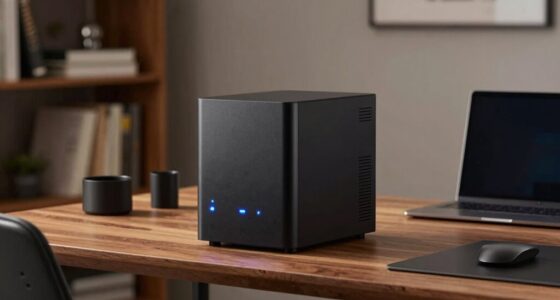
Choosing subscription-free storage depends on your priorities. If you want full control, better privacy, and want to avoid ongoing costs, local storage like external drives or NAS is ideal, but it requires maintenance and backups. Cloud storage offers convenience, easy access, and data redundancy without additional hardware, but it might involve trusting third-party providers and monitoring storage limits. To discover how each option fits your needs and avoid subscription fees, explore the details below.

Prime made for students and young adults
- Fast, free delivery for dorm and study essentials
- Prime Video and Amazon Music included
- Member-only deals
Key Takeaways
- Local storage requires a one-time hardware purchase, avoiding ongoing subscription fees, while cloud storage often involves recurring costs.
- Local storage offers complete control and privacy, whereas cloud storage depends on third-party providers with potential data privacy concerns.
- Scalability is limited with local storage unless additional hardware is purchased, but cloud storage easily adjusts to changing needs.
- Data stored locally is vulnerable to hardware failure or physical damage, while cloud storage provides built-in redundancy.
- Local storage is cost-effective over time for large amounts of data, but cloud storage provides convenience and multi-device access without maintenance.

Ever wondered if you can store your data without paying a subscription fee? The good news is, there are options outside of paid cloud services that let you keep your files safe and accessible. When you’re considering local versus cloud storage, it’s important to weigh factors like data privacy and cost comparison. Each approach offers unique benefits, and understanding these can help you make an informed decision that aligns with your needs.
Considering local versus cloud storage? Weigh privacy and costs to find the best solution for your needs.
If you lean towards local storage, you get the advantage of keeping your data physically close. You can use external hard drives, USB sticks, or network-attached storage (NAS) devices. This method can be surprisingly cost-effective over time because you only pay once for the hardware, avoiding ongoing subscription fees. Plus, with local storage, your data privacy tends to be higher since your files stay on your devices or within your home network. You control who accesses your data, reducing the risk of breaches that can sometimes occur with third-party cloud providers. However, there’s also a downside: you’re responsible for maintaining your hardware, performing backups, and protecting your data from theft or damage. If your hardware fails, data recovery can become costly or complicated.
On the other hand, free cloud storage options are available, but they often come with limitations. Some providers offer limited free plans, which might suffice for light use, but they tend to have caps on storage space and bandwidth. When comparing costs, cloud storage can seem cheaper initially because there’s no upfront hardware investment. Still, if you require more space or advanced features, subscription fees often kick in, and these can add up over time. Privacy is another concern; with cloud storage, your data is stored on servers maintained by third parties, raising questions about data privacy and security. While many reputable providers implement strong encryption, you’re still trusting them with your sensitive information, which might not sit well if you’re handling confidential files. Additionally, data redundancy in cloud solutions helps prevent data loss in case of hardware failures, which is a benefit that local storage doesn’t inherently provide without additional setup.
Ultimately, your choice depends on your priorities. If you prioritize data privacy, avoiding ongoing costs, and having full control over your files, local storage is likely the better fit. But if you prefer convenience, seamless access from multiple devices, and don’t mind paying for extra features, cloud storage might be more appealing—even if it’s subscription-based. Remember, a hybrid approach is also an option: keep critical data locally while backing up less sensitive files to the cloud. By comparing costs and understanding how each method impacts your data privacy, you can select the storage solution that best suits your lifestyle and budget.
As an affiliate, we earn on qualifying purchases.
Frequently Asked Questions
How Secure Is Local Storage Compared to Cloud Solutions?
Local storage is generally more secure if you prioritize physical security and control over data encryption. You can physically protect your devices and manage encryption yourself, reducing external threats. However, it also means you’re responsible for maintaining security measures. Cloud solutions offer data encryption and professional security, but depend on provider trust and internet safety. Ultimately, your security depends on how well you implement data encryption and physical security measures, whether locally or in the cloud.
What Is the Typical Lifespan of Local Storage Devices?
You can expect the typical lifespan of local storage devices to range from 3 to 10 years, depending on device durability and usage. Factors like wear and tear, temperature, and handling affect storage longevity. Regular backups and proper care extend your device’s life, but inevitably, hardware failures may occur. To safeguard your data, consider replacing aging devices proactively and keeping multiple copies in different locations.
Can Local Storage Be Accessed Remotely Without Internet?
Imagine you’re a secret agent with a hidden vault. Can local storage be accessed remotely without internet? Yes, but only if you set up remote access tools like a VPN or network sharing. Without internet dependency, you can’t access your data remotely. You need a network connection, making it impossible to reach your local storage from afar without an internet link. Think of it like trying to call someone without a phone network.
What Are the Environmental Impacts of Cloud Versus Local Storage?
You should know that cloud storage generally consumes more energy due to data centers’ cooling and power needs, increasing environmental impact. Local storage uses less energy but generates e-waste over time as devices become obsolete. By choosing local storage, you may reduce energy consumption and e-waste, but cloud services offer scalability. Balancing these impacts depends on your usage, highlighting the importance of efficient e-waste management and energy practices.
How Does Cost Efficiency Compare Over Time Between Local and Cloud Storage?
Ever wondered which storage option saves you more money over time? Cloud storage often offers better cost efficiency because of flexible scalability options, allowing you to pay only for what you use, and it helps you avoid hefty upfront investments. Local storage might seem cheaper initially, but costs fluctuate with hardware upgrades and maintenance. Over time, cloud storage tends to be more predictable and cost-effective for growing needs.
As an affiliate, we earn on qualifying purchases.
Conclusion
So, which option will you choose—local or cloud? Each has its perks and pitfalls, but the real question is: what are you willing to risk? Will you trust your data to the safety of your own device, or gamble on the unpredictable world of the cloud? The choice isn’t clear-cut, and the stakes are higher than you think. Ultimately, your decision could change the way you store, access, and protect what matters most—are you ready to decide?
As an affiliate, we earn on qualifying purchases.
subscription-free cloud storage device
As an affiliate, we earn on qualifying purchases.
As an affiliate, we earn on qualifying purchases.
Evergreen bestsellers Picks
bestsellers
As an affiliate, we earn on qualifying purchases.