To prevent pain at your standing desk, the key measurement is your elbow height. Stand comfortably and bend your elbows to about 90 degrees, keeping your wrists straight and shoulders relaxed. Adjust the desk so your forearms rest lightly and your monitor stays at eye level. This helps maintain proper posture and reduces strain. Focus on this essential measurement to improve comfort—more helpful tips follow if you want to learn how to get it just right.

Prime made for students and young adults
- Fast, free delivery for dorm and study essentials
- Prime Video and Amazon Music included
- Member-only deals
Key Takeaways
- Adjust the desk so your elbows form roughly a 90-degree angle when your arms are relaxed at your sides.
- Ensure your wrists stay straight and shoulders are relaxed during desk height adjustment.
- Position the monitor at eye level to prevent neck strain and promote proper posture.
- Use ergonomic accessories if your desk isn’t height-adjustable to achieve the correct working height.
- Test the setup by standing comfortably with minimal effort and no tension in your neck, shoulders, or wrists.
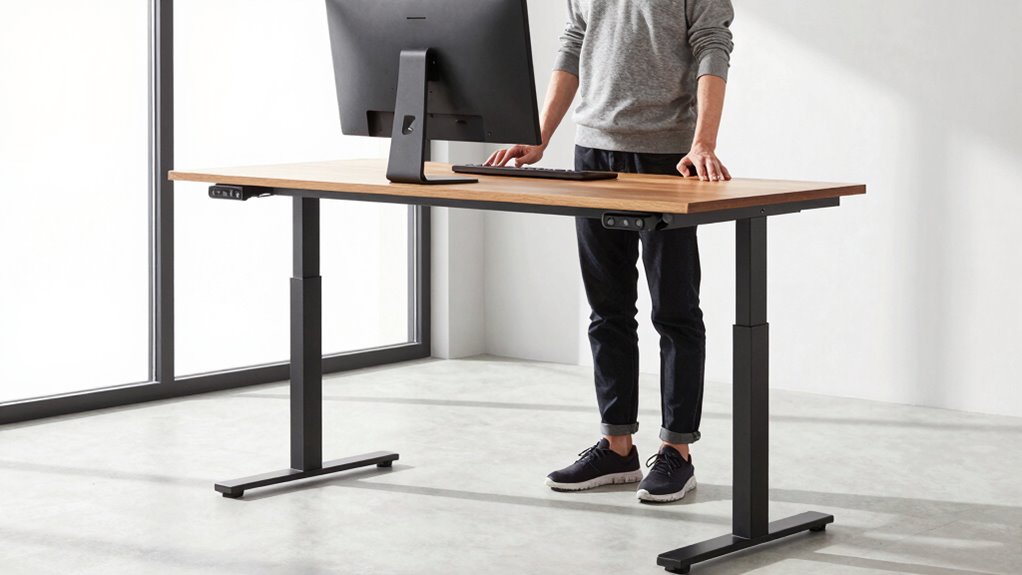
Have you ever wondered if your standing desk is set at the right height? It’s a common question, and the answer can make a big difference in how you feel throughout the day. When your desk is properly adjusted, you reduce the risk of strain, fatigue, and discomfort. The key lies in understanding the right standing desk height for your body and leveraging ergonomic accessories and adjustable desk features to achieve it.
First, consider the importance of ergonomic accessories. These tools, like footrests or monitor arms, help fine-tune your workspace to fit your unique body shape. For example, a footrest can help you shift your weight comfortably and reduce pressure on your lower back, especially if your desk is slightly higher than your natural elbow height. Meanwhile, monitor arms allow you to position your screens at eye level, preventing neck strain. These accessories complement your desk height and ensure your workspace adapts to your needs rather than forcing you into a one-size-fits-all setup.
Ergonomic accessories like footrests and monitor arms customize your workspace for maximum comfort.
Adjustable desk features are equally essential. Most modern standing desks come with height-adjustment mechanisms, giving you the flexibility to find that perfect position. Instead of guessing, you can easily raise or lower the desk until your elbows form roughly a 90-degree angle, with your wrists straight and your shoulders relaxed. When your forearms are parallel to the floor, you’re in a natural, comfortable position that minimizes tension in your neck, shoulders, and arms. Take advantage of the adjustable features to switch between sitting and standing positions throughout the day. Changing postures reduces muscle fatigue and improves circulation, which is imperative for long-term comfort.
To determine the ideal height, stand in front of your desk and set your elbows so they rest comfortably at your sides, forming right angles. Then, adjust the desk so that your hands gently rest on the surface without reaching or slouching. If your desk doesn’t have adjustable features, consider ergonomic accessories like keyboard trays or risers to help achieve this perfect position. Remember, the goal is to keep your wrists straight, your shoulders relaxed, and your monitor at eye level. This setup not only prevents pain but also boosts productivity, as you can focus without constantly adjusting or feeling uncomfortable.
Additionally, being aware of ergonomic principles can guide you in creating a workspace that promotes comfort and reduces strain. In the end, the perfect standing desk height is one that aligns with your body’s natural posture. Use ergonomic accessories and adjustable desk features to customize your workspace. When you get this right, you’ll notice a significant difference in comfort and overall well-being. Prevent pain before it starts by taking the time to set your standing desk at the right height—it’s a small change that can have a big impact.
Frequently Asked Questions
How Often Should I Adjust My Standing Desk Height?
You should adjust your standing desk height every 30 to 60 minutes to maintain comfort. Use ergonomic accessories like anti-fatigue mats and monitor stands to support proper posture. Refer to desk height charts to find the ideal position, ensuring your elbows are at a 90-degree angle and your screen is at eye level. Regular adjustments help prevent strain and keep you comfortable throughout your workday.
What Are Signs My Desk Height Is Incorrect?
If your desk height is off, you’ll notice ergonomic posture issues, like shoulder strain, neck pain, or sore wrists. You might also experience desk misalignment, causing discomfort or fatigue after sitting or standing. Your arms shouldn’t be too high or low when typing, and your monitor should be at eye level. If you feel any of these signs, it’s time to readjust your desk height for better comfort and alignment.
Can the Correct Height Reduce Long-Term Musculoskeletal Issues?
Sure, setting your desk height correctly can save you from future musculoskeletal misery. When you maintain an ergonomic posture, your muscles won’t scream in protest, and ergonomic accessories like footrests or monitor arms make it even better. By fine-tuning your desk height now, you’re investing in a pain-free future, avoiding those nagging neck and back issues. Who knew that one simple measurement could be your ticket to long-term comfort?
Is There a Universal Height for All Users?
There isn’t a universal height for all users because ergonomic principles emphasize adjustable features. You should customize your standing desk height so your elbows are at a 90-degree angle, and your monitor is at eye level. This guarantees proper posture and reduces strain. Adjustability allows you to find the perfect height based on your body size, promoting comfort and preventing long-term musculoskeletal issues. Always prioritize ergonomic principles for ideal setup.
How Do I Measure My Optimal Standing Desk Height?
To measure your ideal standing desk height, follow desk height guidelines that promote ergonomic posture. Stand naturally with your elbows bent at about 90 degrees and your forearms parallel to the ground. Adjust the desk so the surface aligns with this elbow height. This guarantees your wrists stay straight, reducing strain. Regularly check and tweak your setup to maintain comfort and prevent pain during long periods of standing.
Conclusion
Getting your standing desk height just right can prevent pain and boost comfort. Imagine Sarah, a graphic designer who struggled with neck and back aches until she adjusted her desk height perfectly. Now, she works longer hours without discomfort, staying energized and focused. Remember, the right measurement isn’t just a number—it’s your key to healthier, happier workdays. Take the time to find that ideal height, and enjoy the benefits of pain-free productivity.
Fall Picks
fall essentials
As an affiliate, we earn on qualifying purchases.