
Finding the best home NAS storage in 2026 depends on your specific needs, whether it’s for media streaming, data backup, or small business use. The Synology DS223j stands out for its balance of features and affordability, making it ideal for most home users. For power users or small teams, the UGREEN NAS DXP4800 Pro offers robust performance with 10GbE and multiple M.2 slots, but comes with a higher price tag. The main tradeoffs involve balancing capacity, speed, ease of setup, and cost. Continue reading for a detailed breakdown of each option to help you find the perfect fit.
Key Takeaways
- The top-performing options tend to combine high-speed connectivity with scalable storage capacities.
- Ease of setup and user interface are critical for beginners, while advanced features appeal to power users.
- Diskless models often provide better value but require compatible drives and installation effort.
- More bays generally mean more storage flexibility but can add complexity and cost.
- High-end models with 10GbE and M.2 slots are ideal for demanding media or small business use, but may be overkill for casual users.



More Details on Our Top Picks
TERRAMASTER F4-425 Plus NAS Storage – 4-Bay Intel N150 Quad-Core, 16GB DDR5, Dual 5GbE, M.2 Slots, Diskless
The TERRAMASTER F4-425 Plus stands out for its robust hardware, including an Intel N150 quad-core processor and 16GB DDR5 RAM, making it ideal for demanding multimedia and small business use. Compared with the Synology DS223j, it offers much higher processing power and expandability, but this comes with increased complexity in setup and higher overall cost due to the need for drives. Its triple M.2 slots allow for SSD caching, boosting performance significantly, while dual 5GbE ports support link aggregation for fast data transfer. The durable aluminum chassis and hot-swappable drives enhance reliability, though initial configuration can be intimidating for less technical users. This choice makes the most sense for users needing high throughput and extensive storage, willing to handle setup complexity.
Pros:- High-performance quad-core CPU and 16GB DDR5 RAM
- Flexible storage with triple M.2 slots and up to 144TB capacity
- Fast data transfer with dual 5GbE ports and link aggregation
- Durable aluminum enclosure with hot-swappable drives
Cons:- Requires technical knowledge for initial setup
- No included drives, additional cost for HDDs/SSDs
- Potentially overkill for basic storage needs
Best for: Power users who need high-performance storage with expandability for multimedia or small business applications
Not ideal for: Home users seeking simple plug-and-play solutions or those with limited technical skills
- Processor:Intel N150 Quad-Core up to 3.6GHz
- Memory:16GB DDR5 RAM
- Number of Bays:4
- Maximum Storage Capacity:144TB
- Network Interfaces:2 x 5GbE LAN ports
- M.2 Slots:3
Bottom line: This NAS is best suited for technically inclined users who need robust, expandable storage and high-speed data transfer for multimedia or business tasks.
Synology BeeStation 4TB Personal Cloud Storage Device (BST150-4T)
The Synology BeeStation offers a straightforward way to store, share, and access 4TB of data across multiple devices. Its simple setup with QR code scanning makes it accessible for non-technical users, standing in contrast to the more complex TERRAMASTER F4-425 Plus. While it excels at providing seamless file sharing and cloud backups, its limited capacity makes it less suitable for users with growing storage needs. The device’s integration with popular cloud services simplifies backups, and its mobile app ensures easy access on the go. However, the small capacity and reliance on network connection for remote access mean it’s best for personal use rather than media-heavy or business environments. This is ideal for individuals or families wanting hassle-free cloud-like storage.
Pros:- Easy to set up with QR code scanning
- Accessible from desktop and mobile devices
- Supports file sharing and cloud backups
- Compact and lightweight design
Cons:- Limited to 4TB capacity
- Requires network connection for remote access
- Not suitable for large media libraries or intensive workflows
Best for: Home users or small families seeking simple, reliable cloud storage without technical hassle
Not ideal for: Power users needing large capacity or high performance for media editing or backups
- Storage Capacity:4TB
- Model:BST150-4T
Bottom line: This device is perfect for users who prioritize simplicity and cloud-like accessibility over large storage capacity.
Buffalo LinkStation 220 4TB 2-Bay NAS Network Attached Storage with Hard Drives Included
The Buffalo LinkStation 220 simplifies home storage by coming with pre-installed drives, making setup straightforward for non-technical users. Its dual-bay design supports RAID 1, offering data redundancy, which makes it a safe choice for backup and file sharing. Compared to the UGREEN DXP2800, it provides a ready-to-use solution with a 2-year warranty and support, but its limited capacity and basic feature set mean it won’t suit users needing advanced features or larger storage pools. The enclosure’s unspecified material and lack of cloud integrations could be drawbacks for some. This NAS is ideal for families or small offices seeking reliable, easy-to-use storage with basic redundancy.
Pros:- Pre-installed hard drives simplify setup
- Supports RAID 1 for data redundancy
- Secure file sharing with access restrictions
- Includes 2-year warranty and US-based support
Cons:- Limited to RAID 1 configuration, reducing capacity
- Enclosure material unspecified, potentially less durable
- Lacks advanced cloud or multimedia features
Best for: Home users or small offices wanting a simple, reliable storage solution with included drives
Not ideal for: Enthusiasts or users requiring extensive customization, higher capacity, or advanced features
- Storage Capacity:4TB (2x2TB drives)
- Number of Bays:2
- RAID Support:Yes (RAID 1 by default)
- Hard Drive Included:Yes
Bottom line: This NAS offers a hassle-free, reliable storage option with built-in drives, perfect for basic home or small office backup needs.
UGREEN NAS DXP2800 2-Bay Desktop All-Round NASync – Ideal for Small Teams and Enthusiasts
The UGREEN NAS DXP2800 excels with its powerful Intel N100 processor and 8GB DDR5 RAM, making it suitable for small teams or media enthusiasts who need more than just storage. Its support for up to 80TB and cross-platform access offers flexibility, but the lack of included drives means initial costs are higher, akin to the more flexible UGREEN DXP4800. Its 2-bay design limits total capacity, but the support for advanced features like cross-platform encryption and user management makes it a more capable choice for collaborative or multimedia workflows. The device’s 4K HDMI output adds media playback capabilities, yet it may be overkill for basic backups. This pick is ideal for those seeking a balance of performance and user-friendly management in a smaller form factor.
Pros:- Powerful Intel N100 processor and 8GB DDR5 RAM
- Supports up to 80TB storage capacity
- Cross-platform access via app or web
- Supports 4K HDMI output for media playback
Cons:- Hard drives sold separately, increasing initial costs
- Limited to 2-bay capacity, restricting total storage
- More complex setup for advanced features
Best for: Small teams, multimedia enthusiasts, or power users requiring high performance and multi-user support
Not ideal for: Single users with minimal storage needs or those on a tight budget without the need for advanced features
- Processor:Intel N100 Quad-core
- RAM:8GB DDR5
- Storage Capacity:Up to 80TB
- Network:2.5GbE
- M.2 NVMe Slots:2
- Video Output:4K HDMI
Bottom line: This NAS offers a compelling mix of performance, expandability, and multimedia features for small teams and tech-savvy users willing to invest in quality hardware.
UGREEN NAS DXP4800 Pro 4-Bay Desktop NAS, Intel Core i3-1315U, 8GB DDR5, Built-in 128GB SSD, 10GbE & 2.5GbE, M.2 NVMe Slots, 4K HDMI, Diskless
The UGREEN NAS DXP4800 Pro is tailored for users who require high performance and extensive features. Its Intel Core i3-1315U CPU and expandable 8GB DDR5 RAM support virtualization, AI-powered photo management, and complex workflows, positioning it well above the simpler DXP2800. It includes a built-in 128GB SSD for fast OS and caching, and its 10GbE port ensures rapid data transfers. Support for RAID 0, 1, 5, and 10 offers flexible data protection, making it suitable for small businesses or advanced home users. While the hardware is impressive, it’s overkill for basic backups or casual use, and the price may be prohibitive for budget-conscious buyers. This NAS is best suited for power users needing robust, multi-functional storage and networking capabilities.
Pros:- Powerful Intel Core i3-1315U CPU and expandable 8GB DDR5 RAM
- Supports RAID 0, 1, 5, 10 for data protection
- Built-in 128GB SSD for caching and fast boot
- 10GbE connectivity for rapid data transfer
Cons:- May be overkill for basic storage needs
- Price and complexity are higher than entry-level options
- Requires technical knowledge for full utilization
Best for: Small businesses or power users who need high performance, virtualization, and advanced data management
Not ideal for: Casual home users or those seeking simple, low-cost storage solutions
- Processor:Intel Core i3-1315U
- RAM:8GB DDR5 (expandable to 96GB)
- Built-in Storage:128GB SSD
- Maximum Storage Capacity:144TB
- Network Ports:1x 10GbE, 1x 2.5GbE
- M.2 NVMe Slots:2
Bottom line: This NAS is ideal for demanding workflows, virtualization, and users who want a versatile, high-performance storage solution.
UGREEN NAS DH2300 2-Bay Desktop NAS with 64TB Support, AI Photo Tagging, Remote Access, 4GB RAM, 1GbE, 4K HDMI, Diskless
The UGREEN NAS DH2300 stands out as an entry-level option ideal for newcomers wanting simple, secure storage. Its support for up to 64TB and AI-powered photo features make it attractive for personal media management. Compared to the Synology DS223j, this device offers more capacity and AI tools, but lacks advanced features like virtual machines or Docker support, which are available on higher-end models. The setup process is straightforward, making it perfect for users with minimal tech experience, though its limited performance means it’s not suited for heavy or multi-user workloads. Its energy efficiency and layered security add to its appeal for home use. The main tradeoff is the absence of support for Docker or VM hosting, restricting its flexibility for future expansion.
Pros:- Easy to set up and use for beginners
- Supports large storage capacity up to 64TB
- AI features for photo organization and duplicate removal
- Layered security and encryption
Cons:- No support for Docker or virtual machines
- Wi-Fi requires external USB adapter
- Limited performance for multi-user or demanding tasks
Best for: Beginners or families needing simple, secure media and file storage with AI photo tagging.
Not ideal for: Power users or small offices requiring virtual machine support or high-performance multi-user access.
- Capacity:Supports up to 64TB (diskless)
- RAM:4GB LPDDR4X
- Network:1GbE Ethernet port
- Video Output:4K HDMI
- Drive Compatibility:Supports Western Digital, Seagate, Toshiba, excluding M.2 NVMe
- Dimensions:5.94″ D x 3.86″ W x 8.39″ H
- Power:Minimal power consumption
Bottom line: This device is best suited for users seeking straightforward, secure home storage with minimal setup effort.
UGREEN NAS DXP4800 Plus 4-Bay Desktop NAS with Intel Pentium Gold 8505, 8GB DDR5 RAM, 128GB SSD, 10GbE & 2.5GbE, M.2 NVMe Slots, 4K HDMI, Diskless
The UGREEN NAS DXP4800 Plus offers a significant upgrade for small office environments, combining powerful hardware like an Intel Pentium Gold 8505 processor with extensive storage options. Its support for up to 144TB and advanced features like Docker and VM support make it more flexible than the DS223j, which is geared toward personal use. Its dual 10GbE ports provide fast data transfer, ideal for collaborative workflows. However, since drives are not included, initial setup involves additional costs and technical knowledge, especially for optimizing RAID configurations. The larger size and complexity mean it’s less suited for casual or home users, who might prefer simpler solutions. The tradeoff for this power is a steeper learning curve and higher initial investment.
Pros:- High-performance processor suitable for demanding tasks
- Supports up to 144TB total capacity
- Dual 10GbE ports for rapid data transfer
- Supports Docker and virtual machines
Cons:- Drives must be purchased separately
- Setup can be complex for novices
- Bulkier and more complex than typical home NAS
Best for: Small business owners or advanced home users needing high capacity and robust performance.
Not ideal for: Casual users or those new to NAS who want plug-and-play simplicity without extra hardware costs.
- Processor:Intel Pentium Gold 8505 5-Core
- RAM:8GB DDR5
- Storage:Supports up to 144TB (diskless)
- Network Ports:1 x 10GbE, 1 x 2.5GbE
- M.2 NVMe Slots:2
- Video Output:4K HDMI
- Dimensions:Not specified
Bottom line: This NAS is best for tech-savvy users needing extensive storage and advanced features for business or demanding home use.
Synology DiskStation DS223j (2-Bay, Diskless)
The Synology DS223j is a compact, energy-efficient NAS designed for personal cloud storage and media backup. Its small footprint and support for multiple platforms make it suitable for households or small teams that want reliable data access. Compared with the UGREEN DH2300, it offers a more streamlined, energy-conscious design but with fewer features like AI photo tagging. Its 2-bay configuration limits total storage capacity unless drives are added, which can increase costs. Setup involves configuring Synology DSM, which may challenge less tech-savvy users. Its ideal role is for users who prioritize ease of access and data security over raw capacity or advanced features.
Pros:- Compact and energy-efficient design
- Supports multi-platform access
- Includes data backup and security features
- Reliable 2-year warranty
Cons:- Requires setup and DSM configuration
- Limited to 2 bays, restricting total storage
- Additional drives needed for storage capacity
Best for: Home users or small teams seeking secure, energy-efficient cloud storage with simple access.
Not ideal for: Users needing large capacity or advanced media features like AI tagging or 4K output.
- Product Type:System Cabinet
- Number of Bays:2
- Color:White
- Dimensions:6.5 x 3.94 x 8.9 inches
- Compatible Devices:Android, Desktop, Laptop, iPhone
- Warranty:2 years
Bottom line: This NAS is perfect for users seeking a small, reliable, and secure home cloud solution with minimal complexity.
UGREEN NAS DXP8800 Plus 8-Bay Desktop NASync with Intel i5 1235U, 8GB DDR5, 128GB SSD, Dual 10GbE, 2 M.2 NVMe Slots, 8K HDMI, Diskless
The UGREEN NAS DXP8800 Plus is designed for enterprise or demanding business environments, combining a powerful Intel i5 1235U processor with extensive storage potential up to 256TB. Its dual 10GbE ports and support for multiple RAID configurations make it highly suitable for large-scale data management. Compared with smaller NAS like the DS925+, this device offers greater capacity and connectivity, but its size and complexity make it less appealing for casual home users. Storage drives are not included, requiring additional purchase, and the setup can be technically involved. This NAS excels where high performance, flexibility, and large storage are priorities, but it might overwhelm those seeking simple, plug-and-play options.
Pros:- High-performance Intel i5 processor
- Supports up to 256TB with 8 bays
- Dual 10GbE ports for fast transfers
- Flexible RAID options and multiple connectivity ports
Cons:- Drives are sold separately
- Setup complexity for less experienced users
- Bulky desktop form factor
Best for: Large businesses or advanced home users with high storage needs and technical expertise.
Not ideal for: Casual users or small households seeking straightforward setup and moderate storage.
- Processor:Intel i5 1235U 10-Core
- RAM:8GB DDR5
- Storage:Supports up to 256TB (diskless)
- Network:2 x 10GbE ports
- M.2 NVMe Slots:2
- Video Output:8K HDMI
Bottom line: This NAS is best suited for advanced users or organizations needing maximum storage and speed with flexible configurations.
Synology 4-Bay DiskStation DS925+ (Diskless)
The Synology DS925+ offers a robust solution for professional environments, supporting multiple RAID configurations and virtualization features. Its high-speed network throughput of up to 565 MB/s makes it suitable for business-critical tasks, and the 3-year warranty adds confidence for long-term deployment. Compared to the UGREEN DXP8800, it’s more streamlined for storage and data management rather than raw performance or expansion. Its diskless design means users must purchase drives separately, which adds to initial costs. It’s less ideal for those who want plug-and-play simplicity but excels in data security, management flexibility, and reliability for enterprise use.
Pros:- High throughput speeds up to 565 MB/s
- Supports multiple data management solutions
- Reliable 3-year warranty
- Excellent for virtualization and business apps
Cons:- Requires additional drives
- Complex setup for beginners
- No included drives
Best for: Businesses or professionals needing reliable, high-speed storage and virtualization capabilities.
Not ideal for: Home users or casual users looking for simple media or personal cloud solutions.
- Drive Bays:4
- Network Ports:2 x 2.5GbE
- Sequential Read/Write:up to 522/565 MB/s
- Warranty:3 years
Bottom line: This NAS suits organizations or power users requiring high-performance, scalable storage with advanced management options.
Asustor AS5402T 2-Bay NAS with Intel Quad-Core CPU and M.2 NVMe Slots
This model stands out for its powerful quad-core Intel processor, making it well-suited for demanding tasks like gaming, live streaming, and intensive data management. Unlike the Synology DS225+, which is more compact and geared toward straightforward file sharing, the AS5402T offers additional processing power for multitasking and heavy workloads. Its four M.2 NVMe slots enable high-speed SSD cache configurations, a feature not available on most 2-bay units, helping it excel in performance. However, it requires separate disks and lacks an upgradeable RAM option, which could be a limitation for future-proofing. Compared to the BUFFALO TeraStation, it’s more versatile for high-performance needs but less ready out-of-the-box for simple backups. This pick makes the most sense for tech-savvy users needing a balance of speed, expandability, and compact design.
Pros:- Powerful quad-core Intel processor for demanding workloads
- Four M.2 NVMe slots for high-speed SSD caching
- Dual 2.5GbE ports for fast network connectivity
- Compact, sturdy metal enclosure
Cons:- Requires separate hard drives to operate, increasing initial setup cost
- Limited to 2 drive bays, restricting maximum storage expansion
- No RAM upgrade options available
Best for: Power users who need fast, versatile storage for demanding applications like gaming, streaming, or virtual machines
Not ideal for: Home users seeking simple data backup or those with limited technical experience, due to its advanced features
- Processor:Intel Celeron N5105 Quad-Core 2.0GHz
- RAM:4GB DDR4
- Storage Bays:2
- SSD Slots:4 M.2 NVMe
- Network Ports:2x 2.5GbE
- Dimensions:9.06″D x 4.49″W x 6.69″H
- Weight:1500 grams
- Enclosure Material:Metal
- Power:Diskless
Bottom line: This is ideal for tech-savvy users needing high performance and expandable features in a compact form.
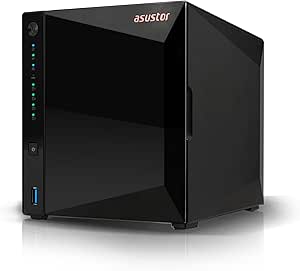
Asustor Drivestor 4 Pro Gen2 AS3304T v2 4-Bay NAS
The AS3304T v2 makes a compelling case for users aiming to build a home media server, thanks to its 1.7GHz quad-core processor optimized for 4K transcoding, which outperforms many 2-bay options like the Synology DS225+ in media applications. Unlike the DS225+’s more general-purpose design, this model emphasizes media streaming and file management with its 4-bay configuration, allowing for more storage flexibility. Its 2GB RAM is sufficient for most media tasks but may fall short for heavy multitasking or advanced server functions. The easy tool-free installation simplifies setup, but it’s still a diskless unit, requiring users to add their own drives. When comparing to the BUFFALO TeraStation, it offers higher performance for media but less focus on enterprise-level features. This makes it a smart choice for households focused on media consumption and sharing, rather than large-scale data backup.
Pros:- Supports 4K video transcoding for smooth media streaming
- Four bays for increased storage capacity and flexibility
- Fast 2.5GbE ports for quick transfers
- Easy tool-free drive installation
Cons:- Limited RAM (2GB) may hinder multitasking or advanced server functions
- Requires separate drives, adding to initial setup cost
- No included drives, so capacity is expandable only through user installation
Best for: Home media enthusiasts seeking a dedicated 4K streaming server with flexible storage options
Not ideal for: Users needing extensive data protection features or enterprise-grade backup solutions, due to its focus on media tasks
- Processor:Realtek RTD1619B 1.7GHz quad-core
- RAM:2GB DDR4
- Number of Bays:4
- Network Ports:2.5GbE
- Supported Video:4K transcoding
- Weight:1500 grams
Bottom line: Ideal for home users prioritizing media streaming and flexible storage, with some limitations on multitasking.
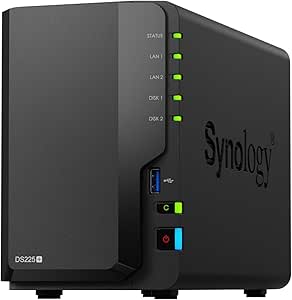
Synology DiskStation DS225+ (Diskless) 2-Bay NAS
The DS225+ offers a well-rounded solution for those needing a compact yet capable NAS, supporting up to 40 TB of storage and delivering impressive transfer speeds of 282 MB/s, ideal for multi-platform access including desktops, laptops, and mobile devices. Compared to the BUFFALO TeraStation, which emphasizes simple backup with included drives, the DS225+ provides more advanced software tools for file sharing, surveillance, and data protection in a smaller footprint. Its 2-bay design limits total capacity compared to larger NAS units, but it remains suitable for most home and small office setups. While it lacks pre-installed drives, its extensive app ecosystem compensates with features like remote access and multimedia support. This is a good choice for users seeking a reliable, feature-rich NAS without the bulk of larger units.
Pros:- High-speed data transfer with up to 282 MB/s read/write
- Compact, lightweight design suitable for various environments
- Supports up to 40 TB of storage and multi-platform access
- Includes extensive data management and surveillance tools
Cons:- Requires users to install and configure drives, increasing initial setup effort
- Limited to 2 drive bays, restricting maximum storage expansion
- Some advanced features may require technical configuration
Best for: Home and small business users wanting a flexible, high-speed NAS with comprehensive management tools
Not ideal for: Users needing maximum storage capacity or enterprise-level features, as it’s limited to 2 bays and requires drive installation
- Model:DS225+
- Drive Bays:2
- Storage Capacity:Up to 40 TB
- Sequential Read/Write:282/217 MB/s
- Dimensions:9.14 x 4.25 x 6.5 inches
- Weight:1300 grams
- Compatibility:Android, Desktop, Laptop, Server, iPhone
- Warranty:3 years
Bottom line: Excellent choice for users seeking a compact, high-performance NAS with broad software support and multi-platform compatibility.
BUFFALO TeraStation Essentials 2025 4-Bay Desktop NAS 16TB with Hard Drives Included
The BUFFALO TeraStation Essentials offers a straightforward, plug-and-play solution with four pre-installed hard drives, making it exceptionally easy for small businesses or home users to get started with reliable data backup and sharing. Compared with the UGREEN NAS options, which are more feature-rich and customizable, the TeraStation emphasizes simplicity and security with RAID options and built-in drives. Its 16TB capacity suits users who prefer an out-of-the-box setup without additional drive purchases, but expanding beyond this capacity requires additional drives or replacements. Its basic design lacks some advanced features like 10GbE or media transcoding, making it less suitable for demanding multimedia workflows. This NAS makes the most sense for users prioritizing ease of use, data security, and immediate deployment over maximum flexibility.
Pros:- Pre-installed hard drives for immediate use
- Easy setup with RAID options for data security
- High-speed 2.5GbE network interface for quick data transfer
- Secure data protection with 256-bit encryption
Cons:- Limited to 16TB capacity without adding more drives
- Basic feature set lacking advanced multimedia or enterprise features
- Designed primarily for simple backup and sharing rather than heavy multitasking
Best for: Small business or home users wanting a reliable, ready-to-use backup solution with minimal setup
Not ideal for: Power users seeking advanced features, large capacity, or high-performance multimedia streaming, due to its limited capacity and feature set
- Capacity:16TB
- Number of Bays:4
- Hard Drive Included:Yes
- RAID Support:RAID 0, RAID 5, RAID 6
- Network Interface:2.5GbE
- Warranty:3 years
Bottom line: Best suited for users wanting an uncomplicated, reliable backup NAS with quick deployment and built-in drives.
How We Picked
Our evaluation focused on a combination of performance, usability, build quality, and value. Priority was given to models that balance ease of setup with robust features, especially for home environments. We also considered expandability, connectivity options, and whether the NAS comes diskless or with drives. The ranking reflects a mix of affordability, feature set, and potential for future growth, ensuring that both beginners and power users find suitable options. Each product was compared directly to similar models to highlight their unique strengths and weaknesses, making the list both practical and comprehensive.Factors to Consider When Choosing Best Home Nas Storage
Choosing the right home NAS storage requires understanding several key factors beyond just capacity. It’s important to consider your intended use — whether for simple backups, media streaming, or small business applications — as this influences the features you need. Compatibility with your existing devices and network speed are also vital. A good NAS should offer a balance between ease of use and expandability, ensuring it grows with your needs without overwhelming you with complexity. Lastly, budget considerations often shape the feature set, so understanding where to prioritize spending can save you money and frustration.Capacity and Scalability
Start by assessing your current storage needs and future growth. Many home users find 4TB to 8TB sufficient for personal backups and media, but those with larger libraries or small business needs might prefer 16TB or more. Look for models with multiple bays, which allow for flexible RAID configurations and easier expansion over time. Diskless units offer the best value if you already have drives or want to choose specific ones, but pre-populated models can simplify setup for beginners.
Performance and Connectivity
Performance hinges on processor speed, RAM, and network interfaces. Models with Gigabit Ethernet are standard, but 2.5GbE or 10GbE ports significantly improve data transfer speeds, especially for media streaming or backup of large files. Consider whether your network hardware supports higher speeds — investing in a NAS with faster ports makes sense only if your network can handle it. Additionally, SSD caching or M.2 slots can boost performance for demanding tasks.
Ease of Use and Management
A user-friendly interface minimizes setup time and daily management. Brands like Synology are renowned for intuitive software that simplifies backups, media management, and remote access. For less tech-savvy users, models with minimal setup steps and clear dashboards reduce frustration. Advanced users may appreciate more control over system settings, RAID options, and app integrations. Balance your comfort level with the available management features to avoid feeling overwhelmed or underpowered.
Build Quality and Reliability
Since a NAS is a long-term investment, durability matters. Look for models with sturdy enclosures and reliable hardware components. Brands with established reputations often provide better firmware updates and customer support, which can extend the lifespan of your device. Check reviews for insights on heat management and noise levels, as these impact usability in a home environment. Remember, a well-built NAS reduces the risk of data loss due to hardware failure.
Budget and Total Cost of Ownership
Prices vary widely based on features and capacity. While diskless models are more affordable upfront, costs for compatible drives and accessories can add up. Consider the total cost over several years, including potential replacement drives, power consumption, and support services. Sometimes spending more initially on a higher-quality unit saves money and hassle in the long run by reducing maintenance and upgrade costs. Carefully weigh your immediate needs against potential future requirements to avoid overspending or underbuying.
Frequently Asked Questions
Is a diskless NAS a better choice for a home user?
Diskless NAS units can offer better value if you already own suitable drives or want to choose specific ones for performance or redundancy reasons. They allow for customization and future upgrades, making them flexible investments. However, they require a bit more technical knowledge to set up and configure correctly. For beginners who prefer a plug-and-play experience, pre-populated models with drives included might be more suitable, even if they cost slightly more upfront.
What is the advantage of higher network speeds like 10GbE in a home NAS?
Higher network speeds like 10GbE dramatically cut down data transfer times, especially when streaming high-definition media or backing up large files. If your home network equipment supports such speeds, investing in a NAS with 10GbE ports can significantly enhance performance. However, the benefit depends on your entire network infrastructure, including routers, switches, and client devices. For most casual users, Gigabit Ethernet remains sufficient, but power users will see tangible improvements with faster options.
How important is the CPU in a home NAS?
The CPU determines how well the NAS can handle multiple tasks simultaneously, such as media streaming, transcoding, or running apps. While basic file serving needs a modest processor, demanding tasks like 4K video transcoding or multiple user access benefit from a more powerful CPU. For most home users, a dual-core or quad-core processor provides ample performance, but those with specific needs should consider models with higher-end CPUs for smoother operation.
Should I prioritize capacity or performance in my NAS?
It depends on your primary use case. If your main goal is storing large media libraries or backups, prioritize capacity and expandability. For real-time media streaming or editing, performance features like SSD caching, faster network ports, and a more capable processor matter more. In many cases, a balance between the two provides the best long-term value, ensuring you don’t compromise speed or storage space as your needs grow.
Are higher-bay NAS units worth the extra cost?
Higher-bay NAS units offer greater flexibility for future expansion and redundancy options, which can be valuable if you anticipate significant data growth or require high availability. However, they tend to be more complex and expensive initially. If your current needs are modest, a smaller, fewer-bay model with the option to expand later might be more cost-effective. For small businesses or media-heavy households, investing in higher-bay devices can provide peace of mind and scalability.
Conclusion
For most home users seeking a reliable, easy-to-use solution, the Synology DS223j offers an excellent blend of affordability and features. Power users or small teams needing high performance will find the UGREEN NAS DXP4800 Pro a compelling choice, despite its higher price. Beginners should lean toward models with simple interfaces and included drives, while those with advanced needs should consider units with faster networking and expandability. Overall, matching your technical comfort level and data demands will guide you to the best pick, whether for casual backups or demanding media workloads.