If you’re choosing between SSDs and HDDs for home storage, consider that SSDs offer faster speeds, quicker boot times, and smoother performance, making them great for gaming or editing. They operate silently and use less power, perfect for quiet environments and energy efficiency. HDDs are better for large backups and archives, as they provide more storage at a lower cost. To discover which option suits your needs best, keep exploring the details ahead.
Key Takeaways
- SSDs offer faster boot times, file transfers, and overall system responsiveness compared to HDDs.
- SSDs operate silently, making them ideal for quiet home environments, unlike noisy HDDs.
- For large storage needs like backups, HDDs are more cost-effective and provide higher capacity options.
- HDDs are easier and cheaper to recover data from after physical damage, whereas SSD recovery is more complex.
- SSDs consume less power and generate less heat, benefiting energy-efficient home setups.
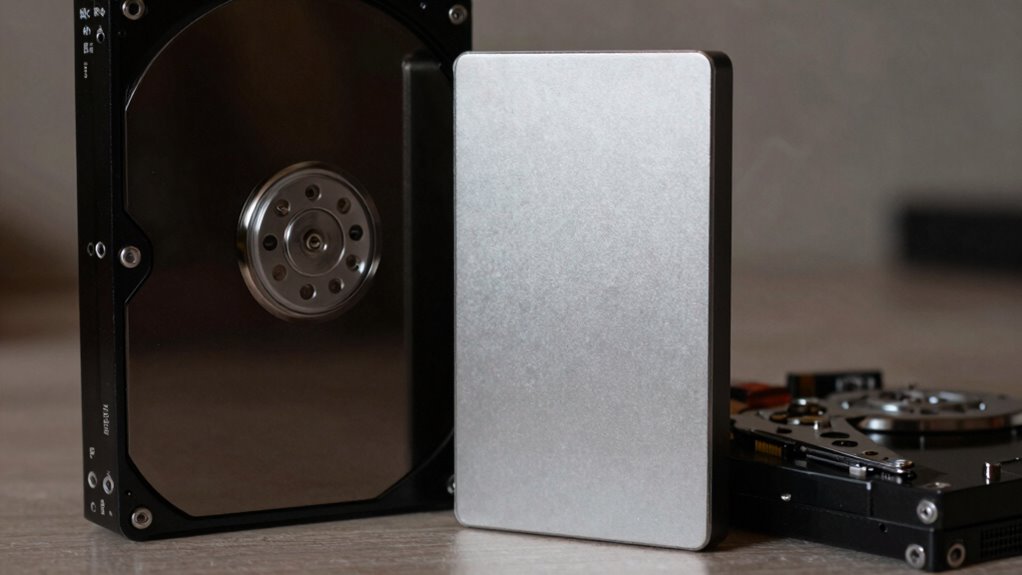
When choosing between SSDs and HDDs for your home storage, understanding their differences can help you make an informed decision. One key aspect to evaluate is speed. SSDs, or solid-state drives, deliver markedly faster data transfer rates than HDDs, or hard disk drives. This means you’ll experience quicker boot times, faster file transfers, and smoother performance overall. If you frequently work with large files or run demanding applications, an SSD can save you time and frustration. On the other hand, HDDs, which use spinning disks and mechanical parts, are slower but tend to be more cost-effective for large storage needs.
SSDs offer faster performance, while HDDs are more affordable for large storage needs.
Noise is another major difference. SSDs operate silently because they have no moving parts, making them ideal for quiet environments or home offices where noise could be disruptive. HDDs, however, produce noise during operation due to their spinning disks and read/write heads moving back and forth. If you prefer a quiet setup, especially in a bedroom or study area, an SSD might be the better choice.
You should also think about use cases. SSDs excel in scenarios where speed and responsiveness are essential — like gaming, video editing, or running an operating system. They are perfect for those who want their system to feel fast and responsive at all times. HDDs are better suited for bulk storage, backups, or archiving files where speed isn’t as vital. They’re also a good option if you need a large capacity drive at a lower cost.
Another important factor is data recovery. In case of accidental deletion or drive failure, SSDs generally make data recovery more challenging compared to HDDs. Because SSDs store data differently and often lack the same level of physical damage vulnerability, recovering data can be more complex and costly. Conversely, HDDs, with their mechanical parts, sometimes offer easier options for data recovery, especially if the failure is related to physical damage. Data recovery methods can vary significantly between these two types of drives, impacting recovery success and cost.
Power consumption is also worth evaluating. SSDs consume less power than HDDs because they have no moving parts, which can lead to lower energy bills and less heat generated. This is particularly beneficial if you’re using your home storage for a device that runs constantly, such as a home server or NAS (Network Attached Storage). Additionally, data storage technology continues to evolve, making SSDs increasingly more efficient and reliable. Overall, if energy efficiency is a priority, an SSD can provide a notable advantage.

SANDISK 1TB Extreme Portable SSD (Old Model) – Up to 1050MB/s, USB-C, USB 3.2 Gen 2, IP65 Water and Dust Resistance, Updated Firmware – External Solid State Drive – SDSSDE61-1T00-G25
Get NVMe solid state performance with up to 1050MB/s read and 1000MB/s write speeds in a portable, high-capacity…
As an affiliate, we earn on qualifying purchases.
As an affiliate, we earn on qualifying purchases.
Frequently Asked Questions
How Do SSDS Impact Overall Energy Consumption at Home?
Switching to SSDs can substantially improve your home’s energy savings because they consume less power than HDDs. Their power efficiency means your devices run cooler and use less electricity, which lowers your overall energy bill. By choosing SSDs for your home storage, you not only boost performance but also contribute to a more energy-efficient environment. They’re a smart upgrade for reducing energy consumption and enhancing system speed.
Can SSDS Improve Gaming Performance Compared to HDDS?
Yes, SSDs can improve your gaming performance compared to HDDs. They offer faster data transfer speeds, reducing load times and smoothing gameplay. You’ll notice lower gaming latency, meaning less delay between your actions and the game’s response. This results in a more seamless experience, especially in fast-paced games. Upgrading to an SSD can give you a competitive edge and make your overall gaming experience much more responsive and enjoyable.
Are SSDS More Resistant to Physical Damage Than HDDS?
Yes, SSDs are generally more resistant to physical damage than HDDs. Their solid-state design means they lack moving parts, which makes them more durable and shock-resistant. You won’t have to worry as much about physical durability when you accidentally drop or bump your device. This shock resistance helps SSDs withstand everyday impacts better, making them a smarter choice if you want reliable storage that can handle rougher conditions.
What Is the Typical Lifespan Difference Between SSDS and HDDS?
You’ll find SSDs typically last 5 to 10 years, while HDDs often last 3 to 5 years. SSD lifespan depends on factors like wear leveling, which evenly distributes data to prevent wear, and data encryption, which can impact drive longevity. HDDs, being mechanical, are more prone to physical wear and failure over time. Proper maintenance and awareness of these factors help you maximize both drives’ lifespan.
How Do Data Recovery Options Differ Between SSDS and HDDS?
When it comes to data recovery, SSDs can be more elusive, making recovery challenges more common after data deletion or failure. Unlike HDDs, where physical damage might still allow for recovery, SSDs store data differently, often making it nearly impossible to retrieve lost files once deleted or corrupted. You should be aware that recovery options are generally more limited and complex with SSDs, so backing up remains especially essential.

Seagate Portable 4TB External Hard Drive HDD – USB 3.0 for PC, Mac, Xbox, & PlayStation – 1-Year Rescue Service (SRD0NF1)
Easily store and access 4TB of content on the go with the Seagate Portable Drive, a USB external…
As an affiliate, we earn on qualifying purchases.
As an affiliate, we earn on qualifying purchases.
Conclusion
When choosing between SSD and HDD for home storage, remember that “you get what you pay for.” SSDs offer speed and silence, perfect for quick access and smooth performance, while HDDs provide ample space at a lower cost, ideal for backups and large files. Consider your needs carefully—speed or capacity? In the end, making the right choice guarantees your storage solution works as hard as you do.

KAMRUI Hyper H2 Mini PC Windows 11 pro, Intel Core 14450HX Mini Computers (10C/16T, 4.8GHz), 32GB RAM 1TB PCle4.0 SSD Micro Desktop PC, Triple 4K Display, USB-C, WiFi6, BT5.2, Business Office Home
【32GB Memory Configuration, Exceptional Value】Driven by rising AI demand, DDR memory supply is tightening, making high-capacity memory more…
As an affiliate, we earn on qualifying purchases.
As an affiliate, we earn on qualifying purchases.

Seagate 8TB Enterprise Capacity 3.5 HDD 7200RPM SATA 6Gbps 256 MB Cache Internal Bare Drive (ST8000NM0055)
High-Reliability Drive for servers, storage systems, and business-centric NAS systems
As an affiliate, we earn on qualifying purchases.
As an affiliate, we earn on qualifying purchases.