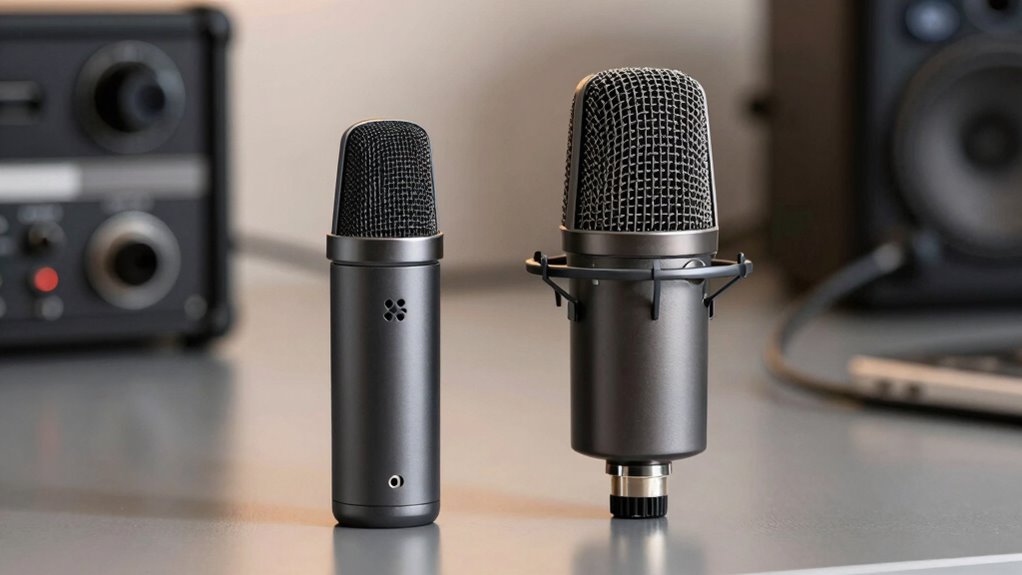

When comparing USB and XLR microphones, you’ll notice that USB mics have built-in digital converters, making them easy to use but often limiting sound quality. XLR setups, paired with high-quality audio interfaces, typically deliver better clarity, dynamic range, and lower noise. While USB models are convenient for quick recordings, XLR systems are preferred for professional audio. If you’re interested in how hardware impacts sound, you’ll find more details below.
Key Takeaways
- XLR microphones often connect to high-quality external audio interfaces, providing superior analog-to-digital conversion compared to USB mics’ built-in ADC.
- External interfaces in XLR setups typically offer better hardware components, resulting in higher overall audio fidelity.
- USB microphones are limited by their internal converters, which can reduce sound quality, especially in budget models.
- XLR systems allow for scalable upgrades, such as better preamps and converters, enhancing long-term audio quality.
- The quality of digital conversion and hardware in XLR setups generally leads to clearer, more detailed sound than most USB microphones.

When choosing a microphone, understanding the differences between USB and XLR options is essential, especially since each type caters to different needs and setups. One of the key factors to contemplate is digital conversion. USB microphones have built-in analog-to-digital converters, meaning they handle the digital conversion process internally. This allows you to connect directly to your computer via a USB port, simplifying setup and reducing the need for extra equipment. In contrast, XLR microphones rely on external audio interfaces or mixers that contain their own analog-to-digital converters. These interfaces handle the digital conversion, often resulting in higher quality audio because you can choose premium interfaces with better analog-to-digital conversion capabilities.
USB mics handle digital conversion internally, offering simplicity; XLR mics rely on external interfaces for higher-quality audio.
Port compatibility plays a significant role in your choice as well. USB microphones are highly compatible with most modern computers and laptops, thanks to their plug-and-play nature. They don’t require additional hardware beyond a free USB port, making them convenient for quick setups, streaming, or home recordings. On the other hand, XLR microphones demand specific port compatibility with audio interfaces, which typically connect via USB, Thunderbolt, or other professional audio connections. This setup might seem more complex initially, but it offers greater flexibility and scalability, especially if you plan to expand your audio system or require higher fidelity.
The digital conversion process directly impacts the overall quality of your recordings. Since USB microphones handle digital conversion internally, their quality varies across models. Budget USB mics often compromise on high-end audio fidelity because their converters are built into the microphone itself and tend to be less sophisticated. Conversely, XLR microphones paired with high-quality external interfaces can deliver superior sound clarity, dynamic range, and low noise levels. This makes XLR setups ideal for professional applications, such as studio recording or broadcasting, where sound quality is paramount. Additionally, hardware quality plays a crucial role in achieving the best audio results.
Port compatibility also influences your mobility and setup options. USB microphones are portable and straightforward—just plug in and start recording. XLR setups require more space and additional equipment, but they are more durable and adaptable over time. If you’re just starting out or need a simple, reliable solution, a USB microphone might be the best choice. However, if you’re seeking top-tier audio quality and the ability to customize your setup, investing in an XLR microphone with a suitable audio interface will serve you better in the long run.

Amazon Basics USB Condenser Microphone for Streaming, Recording, and Podcasting on PC, Plug and Play, Cardioid Pickup, Adjustable Stand with 360° Rotation, Clear Sound, 5.8 x 3.4 inches, Black
CONDENSER MICROPHONE: High sensitivity, low noise, and low distortion with a large 14mm diaphragm and clear sound pickup
As an affiliate, we earn on qualifying purchases.
As an affiliate, we earn on qualifying purchases.
Frequently Asked Questions
Can I Upgrade a USB Microphone to XLR Later?
You can’t directly upgrade a USB microphone to XLR later because of compatibility concerns. USB microphones are built with integrated audio interfaces, making them incompatible with XLR inputs. To switch, you’ll need to purchase a new XLR microphone and an audio interface. While the upgrade potential is there, it involves more than just swapping cables; you’ll need to take into account your existing gear and whether your setup supports the change.
Which Microphone Type Is Better for Live Streaming?
For live streaming, a USB microphone is better due to its sound clarity and ease of setup. While XLR mics offer professional quality, they require extra equipment and technical knowledge, which can complicate live streams. USB microphones deliver quick, plug-and-play convenience, making them ideal for streamers who want reliable, good sound without hassle. So, if simplicity and clarity matter most, stick with a USB mic for your live streams.
Are XLR Microphones More Durable Than USB Models?
Yes, XLR microphones are generally more durable than USB models. Their durability comparison often favors XLR mics because they’re built with higher-quality materials designed to withstand frequent use and rough handling. You’ll find that XLR microphones have sturdier construction, making them more suitable for demanding environments. So, if durability matters most, investing in an XLR mic could give you longer-lasting performance, especially if you handle your gear regularly.
Do I Need Extra Equipment to Use an XLR Mic?
Yes, you’ll need extra equipment to use an XLR mic. Specifically, you’ll require an audio interface to connect the microphone to your computer, and many XLR mics need phantom power, which the interface supplies. Make sure your audio interface is compatible with your microphone, and check if it provides phantom power. This setup guarantees your XLR mic functions properly and delivers high-quality sound.
How Does Cable Length Affect Audio Quality for Each Type?
You might worry about cable length affecting your audio quality, but with proper setup, it’s manageable. For XLR mics, longer cables can lead to signal degradation and interference, so keep runs under 25 feet if possible. USB cables are less sensitive, but longer cords can still cause minor interference. Always use quality cables and avoid running them parallel to power lines to maintain clear sound.

Focusrite Scarlett Solo 3rd Gen USB Audio Interface for Guitarists, Vocalists, Podcasters or Producers to record and playback studio quality sound
Pro performance with great pre-amps – Achieve a brighter recording thanks to the high performing mic pre-amps of…
As an affiliate, we earn on qualifying purchases.
As an affiliate, we earn on qualifying purchases.
Conclusion
Choosing between USB and XLR microphones depends on your needs, but remember, over 60% of professional recording studios prefer XLR for its superior sound quality. If you’re serious about audio, investing in an XLR setup can make a real difference. Whether you’re streaming, podcasting, or recording music, your sound quality matters—and making the right choice can elevate your projects profoundly. Don’t settle for less when your voice deserves the best.
Focusrite Scarlett Solo 3rd Gen USB Audio Interface for Guitarists, Vocalists, Podcasters or Producers to record and playback studio quality sound
Pro performance with great pre-amps – Achieve a brighter recording thanks to the high performing mic pre-amps of…
As an affiliate, we earn on qualifying purchases.
As an affiliate, we earn on qualifying purchases.

Shure SM58-LC Dynamic Vocal Microphone – Professional Handheld Cardioid XLR Mic for Singing, Live Performance, Studio Recording, Podcast & Broadcast, Black
LEGENDARY VOCAL CLARITY: A finely tuned frequency response with subtle midrange lift delivers warm, articulate vocals that cut…
As an affiliate, we earn on qualifying purchases.
As an affiliate, we earn on qualifying purchases.