
Choosing a WiFi 6E router in 2026 means balancing cutting-edge speed, coverage, and future-proofing. The TP-Link AXE16000 (Archer AXE300) stands out for its impressive quad-band setup, ideal for dense environments. Meanwhile, the ASUS ROG Rapture GT-AXE11000 offers powerful gaming features for enthusiasts. However, higher performance often comes with a higher price tag and increased complexity. Continue reading for a detailed comparison that will help you find the perfect fit for your needs.

Prime made for students and young adults
- Fast, free delivery for dorm and study essentials
- Prime Video and Amazon Music included
- Member-only deals
Key Takeaways
- The top routers deliver multi-gigabit speeds, but this often requires a premium price.
- Mesh options like the TP-Link Deco XE70 Pro provide better coverage for larger homes, though they may sacrifice some speed on the edges.
- Gaming-focused routers like the ASUS ROG Rapture GT-AXE11000 offer specialized features that improve latency and stability but are overkill for casual users.
- More bands and antennas generally mean better performance and future-proofing, but add to complexity and cost.
- Compatibility with existing devices and network setup is essential; newer routers aren’t always backward compatible with all older gear.
| TP-Link AXE16000 Quad-Band WiFi 6E Router (Archer AXE300) |  | Best Overall for High-End, Large Networks | Wi-Fi Speed: up to 15.6 Gbps | Bands: Quad-Band (6GHz, 5GHz-1, 5GHz-2, 2.4GHz) | Ports: Two 10G Ports, 1 2.5G Port | VIEW ON AMAZON | See Our Full Breakdown |
| ASUS ROG Rapture GT-AXE11000 Wi-Fi 6E Tri-Band Router |  | Best for Gaming and Power Users | Frequency Band: 6 GHz, 5 GHz, 2.4 GHz | Wireless Speed: up to 11,000 Mbps | Ethernet Ports: 8 ports, including 2.5G LAN/WAN | VIEW ON AMAZON | See Our Full Breakdown |
| NETGEAR Nighthawk Tri-Band WiFi 6E Router RAXE300 |  | Best for Large Coverage and Device Density | WiFi Bands: Tri-band (2.4GHz, 5GHz, 6GHz) | Speed: Up to 7.8 Gbps | Coverage: Up to 2,500 sq. ft. | VIEW ON AMAZON | See Our Full Breakdown |
| TP-Link AXE5400 Tri-Band WiFi 6E Router (Archer AXE75) |  | Best for Balanced Speed and Features | Wi-Fi Speed: up to 5400 Mbps | Bands: Tri-Band (6 GHz, 5 GHz, 2.4 GHz) | Processor: 1.0 GHz dual-core | VIEW ON AMAZON | See Our Full Breakdown |
| TP-Link Deco XE70 Pro AXE4900 Tri-Band WiFi 6E Mesh WiFi Router, 1-Pack |  | Best for Whole-Home Coverage and Smart Homes | Wi-Fi Speed: up to 4.9 Gbps | Coverage: up to 2,900 sq. ft. | Number of Devices: up to 200 | VIEW ON AMAZON | See Our Full Breakdown |
| ASUS ROG Rapture WiFi 6E Gaming Router (GT-AXE16000) | 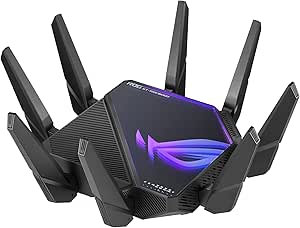 | Best Overall for High-End Gaming and Power Users | WiFi Standard: WiFi 6E (802.11ax) | Bands: Quad-band | Max Speed: 16000 Mbps | VIEW ON AMAZON | See Our Full Breakdown |
| TP-Link Tri-Band AXE5400 Wi-Fi 6E Gaming Router Archer GXE75 |  | Best for Gamers Seeking Reliable High-Speed Connections | Wi-Fi Speed: up to 5.4 Gbps | Bands: Tri-Band (including 6 GHz) | Ports: 1x 2.5G WAN, 4x 1G LAN | VIEW ON AMAZON | See Our Full Breakdown |
| MSI Radix AXE6600 WiFi 6E Tri-Band Gaming Router |  | Best for Aesthetic-Focused Enthusiasts and Power Users | Tri-band: 2.4GHz + 5GHz + 6GHz | WiFi Standard: WiFi 6E | Streams: 8-streams | VIEW ON AMAZON | See Our Full Breakdown |
| wifi 6e router | Processor | Wi-Fi Speed | Bands | Ports |
|---|---|---|---|---|
| TP-Link AXE16000 Quad-Band WiF | Quad-Core CPU | up to 15.6 Gbps | Quad-Band (6GHz, 5GHz-1, 5GHz-2, 2.4GHz) | Two 10G Ports, 1 2.5G Port |
| ASUS ROG Rapture GT-AXE11000 W | Quad-core CPU | — | — | — |
| NETGEAR Nighthawk Tri-Band WiF | 1.7GHz quad-core | — | — | 4 x 1G, 1 x 2.5G |
| TP-Link AXE5400 Tri-Band WiFi | 1.0 GHz dual-core | up to 5400 Mbps | Tri-Band (6 GHz, 5 GHz, 2.4 GHz) | — |
| TP-Link Deco XE70 Pro AXE4900 | — | up to 4.9 Gbps | — | — |
| ASUS ROG Rapture WiFi 6E Gamin | — | — | Quad-band | Dual 10G ports, 2.5G WAN port |
| TP-Link Tri-Band AXE5400 Wi-Fi | — | up to 5.4 Gbps | Tri-Band (including 6 GHz) | 1x 2.5G WAN, 4x 1G LAN |
| MSI Radix AXE6600 WiFi 6E Tri- | 1.8 GHz quad-core | — | — | — |
More Details on Our Top Picks
TP-Link AXE16000 Quad-Band WiFi 6E Router (Archer AXE300)
The TP-Link AXE16000 stands out for its exceptional speeds up to 15.6 Gbps and extensive coverage, thanks to eight antennas and quad-band support. Unlike the NETGEAR RAXE300, which is more focused on ease of setup and security, this model prioritizes raw performance and versatility with multiple high-speed ports and advanced security features like TP-Link HomeShield. The tradeoff is that it requires a technical setup and a compatible modem, making it less user-friendly for beginners. It’s perfect for large households or small businesses that need maximum bandwidth and coverage without compromise.
Pros:- Exceptional Wi-Fi speeds up to 15.6 Gbps for demanding tasks
- Supports Wi-Fi 6E with 6 GHz band for near-zero latency
- Multiple high-speed ports for versatile wired connections
- Enhanced security features with TP-Link HomeShield
Cons:- Two 10G ports cannot be used simultaneously as WAN ports
- Requires a compatible modem for most internet providers
- Complex setup may be daunting for non-technical users
Best for: Large households or small businesses needing extensive coverage and high-speed connections
Not ideal for: Casual home users or those with limited technical skills due to its complexity
- Wi-Fi Speed:up to 15.6 Gbps
- Bands:Quad-Band (6GHz, 5GHz-1, 5GHz-2, 2.4GHz)
- Ports:Two 10G Ports, 1 2.5G Port
- Processor:Quad-Core CPU
- Antennas:8 x antennas
- Security:TP-Link HomeShield, VPN Server/Client
Our verdict“This router is best suited for those who need maximum performance and coverage and are comfortable with advanced setup processes.”
ASUS ROG Rapture GT-AXE11000 Wi-Fi 6E Tri-Band Router
The ASUS ROG GT-AXE11000 delivers speeds up to 11,000 Mbps across three bands, making it ideal for gamers and high-demand streaming. Compared to the TP-Link AXE16000, it emphasizes a tri-band design to reduce interference and optimize performance for gaming and media. Its 2.5G Ethernet port adds wired speed benefits, but the setup can be complicated for those unfamiliar with advanced networking. The large size and premium price point make it best suited for dedicated gaming setups or tech-savvy users who prioritize ultra-fast, low-latency connections.
Pros:- Supports Wi-Fi 6E with ultra-fast speeds up to 11 Gbps
- Tri-band design minimizes interference for smoother gaming
- Includes a 2.5G Ethernet port for high-speed wired connections
- Optimized with triple-level game acceleration
Cons:- Setup process can be challenging for non-technical users
- Premium price may be prohibitive for casual users
- Large form factor requires ample space for placement
Best for: Gamers and tech enthusiasts needing ultra-fast, low-latency Wi-Fi for intensive applications
Not ideal for: Average users or small households with basic internet needs due to its complexity and cost
- Frequency Band:6 GHz, 5 GHz, 2.4 GHz
- Wireless Speed:up to 11,000 Mbps
- Ethernet Ports:8 ports, including 2.5G LAN/WAN
- Processor:Quad-core CPU
- Memory:16 GB RAM
- Coverage:Wide area
Our verdict“This router is ideal for dedicated gamers and power users seeking top-tier, low-latency Wi-Fi performance with advanced features.”
NETGEAR Nighthawk Tri-Band WiFi 6E Router RAXE300
The NETGEAR Nighthawk RAXE300 offers speeds up to 7.8 Gbps and a dedicated 6GHz band, making it suitable for large homes with many devices—up to 40 supported simultaneously. While the ASUS GT-AXE11000 emphasizes gaming, this model focuses on providing broad coverage and easy management via the Nighthawk app. Its limited to U.S. use and requires a separate modem, which could be a hurdle for some users. Compared with the TP-Link AXE16000, it offers easier setup and security but at a slightly lower maximum speed, making it a solid choice for households with many smart devices.
Pros:- High-speed Wi-Fi 6E with dedicated 6GHz band
- Supports up to 40 devices simultaneously
- Wide coverage up to 2,500 sq. ft.
- User-friendly setup via the Nighthawk app
Cons:- Separate modem needed for internet access
- Limited to U.S. markets only
- Lower maximum speed compared to some rivals
Best for: Large homes requiring extensive coverage and simple device management
Not ideal for: International users or those seeking the absolute highest speeds for demanding tasks
- WiFi Bands:Tri-band (2.4GHz, 5GHz, 6GHz)
- Speed:Up to 7.8 Gbps
- Coverage:Up to 2,500 sq. ft.
- Supported Devices:Up to 40
- Processor:1.7GHz quad-core
- Ports:4 x 1G, 1 x 2.5G
Our verdict“This router is best for large households needing broad coverage and easy setup, with a focus on device management over raw speed.”
TP-Link AXE5400 Tri-Band WiFi 6E Router (Archer AXE75)
The TP-Link AXE5400 delivers solid speeds up to 5400 Mbps across three bands, including the new 6 GHz spectrum for lower latency. Compared to the RAXE300, it offers a more balanced mix of performance and user-friendly features, such as EasyMesh support for seamless whole-home Wi-Fi and VPN capabilities for secure remote access. Its dual-core CPU and 512 MB RAM support its speed and multitasking, but advanced features may overwhelm non-technical users. It suits those wanting reliable high-speed Wi-Fi with easy expansion options.
Pros:- Fast tri-band Wi-Fi speeds with 6 GHz band
- Supports EasyMesh for simple mesh expansion
- Built-in VPN server and client support
- Reliable performance with heat dissipation design
Cons:- Requires a modem for most ISPs
- Advanced features may be complex for some users
- Higher price than basic routers
Best for: Home users seeking a balance of speed, coverage, and ease of use
Not ideal for: Extreme gamers or professionals needing maximum throughput for large data loads
- Wi-Fi Speed:up to 5400 Mbps
- Bands:Tri-Band (6 GHz, 5 GHz, 2.4 GHz)
- Processor:1.0 GHz dual-core
- Memory:512 MB
- Supports EasyMesh:Yes
- VPN Support:Yes
Our verdict“This router offers a strong balance of speed, features, and ease of setup for most high-performance home networks.”
TP-Link Deco XE70 Pro AXE4900 Tri-Band WiFi 6E Mesh WiFi Router, 1-Pack
The TP-Link Deco XE70 Pro excels in providing seamless coverage up to 2,900 sq. ft. with Wi-Fi speeds up to 4.9 Gbps. Its mesh design allows easy expansion to cover larger areas and handle over 75 devices simultaneously, making it ideal for smart homes and streaming. While it’s less focused on raw speed compared to the AXE16000, its simplicity in setup and management via the Deco app makes it accessible for most users. However, to fully benefit from Wi-Fi 6E, compatible devices are necessary, and the price reflects its premium, expansive coverage.
Pros:- Supports Wi-Fi 6E with speeds up to 4.9 Gbps
- Seamless mesh coverage for large homes
- Handles over 75 devices smoothly
- Easy to set up and manage via Deco app
Cons:- Premium price point
- Requires Wi-Fi 6E-compatible devices to leverage full speed
- Less suited for high-end gaming due to lower max speed
Best for: Homeowners needing reliable, large-area Wi-Fi coverage with many connected devices
Not ideal for: Users seeking the highest possible speeds for gaming or large file transfers
- Wi-Fi Speed:up to 4.9 Gbps
- Coverage:up to 2,900 sq. ft.
- Number of Devices:up to 200
- Number of Bands:Tri-band
- Wired Connectivity:2.5 Gbps port, 2 Gbps ports
- Security:Advanced security with parental controls and IoT protection
Our verdict“This mesh system is ideal for large homes aiming for broad, reliable Wi-Fi coverage and device capacity over raw speed.”
ASUS ROG Rapture WiFi 6E Gaming Router (GT-AXE16000)
The ASUS ROG Rapture GT-AXE16000 stands out for its ultra-fast quad-band WiFi 6E speeds up to 16 Gbps, making it ideal for demanding gaming setups or large households with multiple high-bandwidth devices. Compared with the MSI Radix AXE6600, it offers more extensive coverage and multiple high-speed ports, though that comes with a significantly higher price and a more complex setup process. This router excels in environments where top-tier performance and advanced features like AiMesh and triple-level game acceleration are necessary, but less so for casual users who won’t utilize its full potential.
Pros:- Exceptional speeds up to 16 Gbps for intensive gaming and streaming
- Expanded coverage with ASUS RangeBoost Plus technology
- Multiple high-speed ports including dual 10G ports for demanding tasks
- Supports advanced gaming features like triple-level acceleration
Cons:- High price may be prohibitive for many buyers
- Setup process can be intimidating for non-technical users
Best for: Gamers and tech enthusiasts who want the fastest, most feature-rich WiFi 6E experience and are comfortable with complex setups.
Not ideal for: Casual users or small households seeking a simple, budget-friendly WiFi upgrade, as the cost and complexity may be unwarranted.
- WiFi Standard:WiFi 6E (802.11ax)
- Bands:Quad-band
- Max Speed:16000 Mbps
- Frequency Band:6 GHz
- Ports:Dual 10G ports, 2.5G WAN port
- Features:AiMesh support, Triple-level game acceleration, Lifetime internet security, Instant Guard
Our verdict“This router is best suited for high-end gamers and power users who need maximum performance and are willing to navigate a complex setup.”
TP-Link Tri-Band AXE5400 Wi-Fi 6E Gaming Router Archer GXE75
The TP-Link Archer GXE75 offers a solid tri-band WiFi 6E experience with speeds up to 5.4 Gbps, making it a strong choice for gamers looking for congestion-free performance on the 6 GHz band. It surpasses the MSI Radix AXE6600 in terms of ease of setup—thanks to the Tether app—and provides dedicated features like game acceleration and real-time network insights, which are tailored for gaming. However, its maximum speed is lower than the ASUS ROG GT-AXE16000, and its feature set is more focused on gaming rather than broad home use, making it less versatile for general households.
Pros:- Tri-band WiFi 6E with 6 GHz congestion-free band
- Dedicated game acceleration and real-time network management
- Simple setup via Tether app or web interface
- Includes a 2.5G WAN port for fast internet connections
Cons:- Designed primarily for gaming, limiting appeal for general use
- Price may be high relative to basic routers, with features overkill for casual users
Best for: Dedicated gamers who prioritize a straightforward setup and reliable, high-speed gaming performance.
Not ideal for: Casual internet users or those needing a multi-purpose router with extensive smart home integrations, since it mainly targets gaming optimization.
- Wi-Fi Speed:up to 5.4 Gbps
- Bands:Tri-Band (including 6 GHz)
- Ports:1x 2.5G WAN, 4x 1G LAN
- Security:TP-Link HomeShield
- Setup:Tether app or web interface
Our verdict“Ideal for gamers seeking a dedicated, easy-to-manage high-speed router with gaming-specific features.”
MSI Radix AXE6600 WiFi 6E Tri-Band Gaming Router
The MSI Radix AXE6600 combines high-speed tri-band WiFi 6E with a 1.8 GHz quad-core processor, making it a compelling choice for users who want both performance and style. Its AI QoS and Game Accelerator promise seamless gaming, while the RGB lighting adds a customizable aesthetic element. Compared to the ASUS ROG GT-AXE16000, it offers a less extreme maximum speed but excels in a visually appealing design and reliable multitasking capacity. The setup process may be challenging for non-technical users, and the premium features come with a higher price tag, which might make it less attractive for budget-conscious buyers.
Pros:- Supports high-speed WiFi 6E with tri-band connectivity
- Powerful 1.8 GHz quad-core processor for multitasking
- Customizable RGB Mystic Light for aesthetic appeal
- AI QoS optimizes data prioritization for gaming
Cons:- Setup can be complex for non-technical users
- Potentially expensive compared to standard routers
Best for: Tech-savvy gamers or enthusiasts who value high performance alongside aesthetic customization.
Not ideal for: Average users or those seeking a straightforward, no-fuss router, since setup can be complex and its price premium might not justify basic needs.
- Tri-band:2.4GHz + 5GHz + 6GHz
- WiFi Standard:WiFi 6E
- Streams:8-streams
- Speed:up to 6.6Gbps
- Processor:1.8 GHz quad-core
- Features:AI QoS, RGB Mystic Light, Game Accelerator
Our verdict“Best suited for users who want a high-performance, visually customizable router that balances gaming and style.”
How We Picked
These routers were evaluated based on performance benchmarks, build quality, ease of setup, features, and value for money. We prioritized models offering multi-gigabit speeds, extensive coverage, and advanced security features. The ranking reflects a balance between cutting-edge technology and practical usability for different types of users, from casual households to demanding gamers. Price was also considered, ensuring options are accessible for various budgets while still delivering on 6E capabilities.| wifi 6e router | Wi-Fi Speed | Bands |
|---|---|---|
| TP-Link AXE16000 Quad-Band WiF | up to 15.6 Gbps | Quad-Band (6GHz, 5GHz-1, 5GHz-2, 2.4GHz) |
| ASUS ROG Rapture GT-AXE11000 W | — | — |
| NETGEAR Nighthawk Tri-Band WiF | — | — |
| TP-Link AXE5400 Tri-Band WiFi | up to 5400 Mbps | Tri-Band (6 GHz, 5 GHz, 2.4 GHz) |
| TP-Link Deco XE70 Pro AXE4900 | up to 4.9 Gbps | — |
| ASUS ROG Rapture WiFi 6E Gamin | — | Quad-band |
| TP-Link Tri-Band AXE5400 Wi-Fi | up to 5.4 Gbps | Tri-Band (including 6 GHz) |
| MSI Radix AXE6600 WiFi 6E Tri- | — | — |
Factors to Consider When Choosing Wifi 6e Router
When selecting a WiFi 6E router, it’s vital to consider not just raw speed but how well it fits your home environment and future needs. The right router should provide reliable coverage, security, and ease of use. Understanding these factors can prevent overpaying for features you don’t need or ending up with a device that can’t support your growing network demands.Coverage and Range
Assess your home size and layout before choosing a router. Larger homes or multi-floor setups benefit from mesh systems or routers with multiple antennas. A router with strong coverage reduces dead zones and ensures consistent performance across all devices. Keep in mind that adding mesh nodes can slightly decrease individual node speeds but greatly improve overall coverage.
Speed and Multi-Gig Support
While WiFi 6E supports multi-gigabit speeds, actual performance depends on your internet plan and device compatibility. Look for routers with multi-gig ports (e.g., 2.5GbE) to maximize wired connections. For wireless, ensure your devices support WiFi 6E to take full advantage of the speed improvements, especially for high-bandwidth activities like 4K streaming or large file transfers.
Ease of Setup and Management
User-friendly apps and intuitive web interfaces make a big difference in setting up and maintaining your network. Some routers offer advanced features like automatic firmware updates, parental controls, and QoS settings that help optimize performance. Avoid overly complex devices if you’re not comfortable with network configurations, but recognize that more features might require a learning curve.
Security Features
Security should be a priority, especially with faster speeds increasing potential attack surfaces. Look for routers with WPA3 encryption, automatic updates, and guest network options. Some models also offer integrated security services for real-time threat detection, which can be valuable for households with multiple connected devices and IoT gadgets.
Price and Future-Proofing
WiFi 6E routers vary significantly in price, often reflecting their features and performance levels. Investing in a slightly higher-priced model can extend the relevance of your network hardware as more WiFi 6E-compatible devices become common. However, avoid overspending on features you won’t use, and consider how long your current devices will benefit from the upgrade.
Frequently Asked Questions
Will my existing devices benefit from a WiFi 6E router?
Most modern devices that support WiFi 6E will see a noticeable performance boost with a compatible router, especially in terms of speed, latency, and connection stability. However, older devices that only support WiFi 5 or earlier won’t directly benefit from the new frequency bands. Upgrading your router makes the most sense if you’re planning to add new WiFi 6E-capable devices or want to future-proof your network.
Is a WiFi 6E router worth the extra cost over WiFi 6 or WiFi 5 models?
For most users, WiFi 6E offers a significant advantage in speed, reduced congestion, and future compatibility, especially in busy households or offices. The extra cost can be justified if you need higher throughput for multiple devices or want to maximize coverage. However, if your current setup meets your needs and few devices support WiFi 6E yet, sticking with WiFi 6 or 5 might be more economical.
How difficult is it to set up a WiFi 6E router?
Many WiFi 6E routers come with user-friendly apps that guide you step-by-step through setup. For most users, installation is straightforward, similar to setting up a smartphone. More advanced features, like mesh configurations or custom security settings, may require some familiarity with network management, but comprehensive guides and customer support are often available to assist.
Can I mix WiFi 6E routers with older WiFi standards?
Yes, WiFi 6E routers are backward compatible with WiFi 5 and earlier standards. This means you can integrate older devices into your new network without issues. However, those devices won’t benefit from the higher speeds and lower latency of WiFi 6E. For optimal performance, consider upgrading critical devices that require faster connections first.
What should I prioritize: speed, coverage, or features?
This depends on your specific needs. If you stream 4K videos or game online, prioritize speed and low latency. For large homes, coverage takes precedence, making mesh systems or routers with multiple antennas more suitable. Features like security, parental controls, and user management add value but should be balanced against your budget and technical comfort level. Understanding your primary use cases helps make the best choice.
Conclusion
For most users, the TP-Link AXE16000 (Archer AXE300) offers the best blend of performance and future-proofing, making it ideal as the overall best. Budget-conscious buyers who want solid WiFi 6E performance without breaking the bank should consider the TP-Link Deco XE70 Pro, which provides excellent coverage for less. Enthusiasts and gamers will appreciate the ASUS ROG Rapture GT-AXE11000 for its specialized features, though it commands a higher price. Beginners or less tech-savvy users may find the TP-Link Archer AXE75 straightforward to set up and manage, offering a good entry point. Ultimately, your choice should align with your home size, device needs, and budget, ensuring a network that is both fast and reliable now and in the future.