Finding the right DJ controller under $1000 means balancing professional features with budget constraints. The Pioneer DJ DDJ-FLX4 stands out as the best overall choice, offering industry-standard layout and seamless integration with modern DJ software. For those prioritizing extreme portability, the AlphaTheta DDJ-FLX2 delivers a compact form factor without sacrificing core mixing capabilities. Meanwhile, the Pioneer DJ XDJ-RR serves as a strong contender for users who want standalone performance. The primary tradeoff in this price range is between screen integration, build durability, and channel count. Read on to see how these eleven models stack up against each other in real-world scenarios.

Prime made for students and young adults
- Fast, free delivery for dorm and study essentials
- Prime Video and Amazon Music included
- Member-only deals
Key Takeaways
- Screen integration is the biggest differentiator between sub-$500 and sub-$1000 controllers, with the XDJ-RR offering a laptop-free workflow.
- Most controllers under $1000 are 2-channel; the DDJ-GRV6 is a rare 4-channel option that justifies its higher price point for complex sets.
- Software dependency defines the ecosystem: Pioneer and AlphaTheta favor rekordbox/Serato, while Numark leans heavily into Serato DJ Lite/Pro.
- Portability does not always equal lower quality; the DDJ-FLX2 proves that ultra-compact units can still offer professional-grade connectivity via USB-C.
- Bundle value often outweighs standalone savings, as seen with the DDJ-FLX4 bundle which includes essential accessories for a marginal cost increase.
| Pioneer DJ DDJ-FLX4 2-Channel DJ Controller, Graphite |  | Best Overall for Beginners | Channels: 2 | Performance pads: 16 | Connectivity: USB, Bluetooth | VIEW ON AMAZON | See Our Full Breakdown |
| AlphaTheta Pioneer DJ DDJ-FLX2 2-Channel DJ Controller with Smart Fader and USB-C |  | Best Compact Starter | Channels: 2 | Connectivity: USB-C, Bluetooth | Compatible devices: Android, iOS, Windows, PC, Mac | VIEW ON AMAZON | See Our Full Breakdown |
| Hercules DJControl Inpulse 200 MK3 DJ Controller |  | Best for Guided Learning | Decks: 2 | Jog wheels: Touch-sensitive | Performance pads: 4 per deck | VIEW ON AMAZON | See Our Full Breakdown |
| Pioneer DJ DDJ-FLX4 2-Channel DJ Controller Bundle with Carrying Case and Polishing Cloth |  | Best Bundle for Mobile DJs | Channels: 2 | Compatible software: rekordbox, Serato DJ Lite, Serato DJ Pro (license required), djay | Compatible devices: PC, Mac, iPhone, iPad, Android devices | VIEW ON AMAZON | See Our Full Breakdown |
| Numark Mixtrack Platinum FX DJ Controller |  | Best for Four-Deck Control | Control decks: 4 | Audio interface: Built-in, 24-bit | Connectivity: USB plug and play for Mac and Windows | VIEW ON AMAZON | See Our Full Breakdown |
| Numark Mixtrack Pro FX Serato DJ Controller with 2 Decks, Mixer, Effects Paddles and Audio Interface |  | Best Value for Hands-On Serato Mixing | Decks: 2 | Audio interface: 24-bit | Computer connection: USB plug and play for Mac and Windows | VIEW ON AMAZON | See Our Full Breakdown |
| Pioneer DJ DDJ-REV1 2-Deck Serato DJ Controller, Black |  | Best for Learning Battle-Style Mixing | Channels: 2 | Software: Serato DJ Lite | Connectivity: USB, auxiliary | VIEW ON AMAZON | See Our Full Breakdown |
| Pioneer DJ XDJ-RR Digital DJ System |  | Best Standalone-Style System | Product type: All-in-one digital DJ system | System format: Integrated DJ system | Controls: Intuitive control interface, as described in the product data | VIEW ON AMAZON | See Our Full Breakdown |
| AlphaTheta DDJ-GRV6 4-Channel DJ Controller | 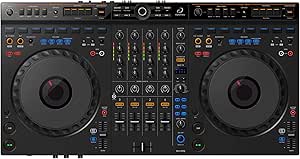 | Best for Four-Channel Creative Mixing | Channels: 4 | Compatible software: rekordbox and Serato DJ Pro | Connectivity: USB, auxiliary | VIEW ON AMAZON | See Our Full Breakdown |
| Numark DJ2GO2 Touch Compact DJ Controller |  | Best Compact Controller | Channels: 2 | Connectivity: USB, 1/8-inch headphone output, 1/8-inch main output | Software compatibility: Serato DJ Lite; MIDI mapping for other DJ software | VIEW ON AMAZON | See Our Full Breakdown |
| Pioneer DJ DDJ-FLX4 2-Channel DJ Controller, White |  | Best for Streaming Integration and Beginner Learning | Channels: 2 | Connectivity: USB | Supported Software: Serato DJ Lite, rekordbox | VIEW ON AMAZON | See Our Full Breakdown |
| dj controller under 1000 | Connectivity | Channels |
|---|---|---|
| Pioneer DJ DDJ-FLX4 2-Channel | USB, Bluetooth | 2 |
| AlphaTheta Pioneer DJ DDJ-FLX2 | USB-C, Bluetooth | 2 |
| Hercules DJControl Inpulse 200 | — | — |
| Pioneer DJ DDJ-FLX4 2-Channel | USB Type-C, Bluetooth | 2 |
| Numark Mixtrack Platinum FX DJ | USB plug and play for Mac and Windows | — |
| Numark Mixtrack Pro FX Serato | — | — |
| Pioneer DJ DDJ-REV1 2-Deck Ser | USB, auxiliary | 2 |
| Pioneer DJ XDJ-RR Digital DJ S | — | — |
| AlphaTheta DDJ-GRV6 4-Channel | USB, auxiliary | 4 |
| Numark DJ2GO2 Touch Compact DJ | USB, 1/8-inch headphone output, 1/8-inch main output | 2 |
| Pioneer DJ DDJ-FLX4 2-Channel | USB | 2 |
More Details on Our Top Picks
Pioneer DJ DDJ-FLX4 2-Channel DJ Controller, Graphite
The DDJ-FLX4 is my strongest all-around pick for a new DJ who wants room to learn without taking on an elaborate setup. Its familiar two-channel layout, 16 performance pads, and Smart Fader make basic mixing and cue-based experimentation approachable. Compared with the simpler DDJ-FLX2, it offers more pads and a broader set of hands-on performance controls; the Mixtrack Platinum FX is the better fit if four-deck control and display-equipped jog wheels matter more than a straightforward learning path.
At 2.8 kg, the FLX4 is easy to carry, and USB or Bluetooth connectivity supports computer and mobile-device setups. The tradeoff is its two-channel, two-deck focus: it is not the choice for layered four-deck mixes. Streaming and some mixing functions also depend on compatible apps and services.
Pros:- Beginner-oriented layout leaves room to develop beyond basic transitions
- Smart Fader assists with volume, bass, and BPM adjustments during transitions
- Sixteen pads support Hot Cues, Pad FX, Beat Jump, and Sampler functions
- Built-in sound card and USB or Bluetooth connectivity suit computer and mobile setups
Cons:- Two-channel, two-deck control limits more layered mixing
- Some streaming and mixing features depend on compatible apps and services
Best for: New DJs who want a portable, approachable controller with enough pads and app compatibility to build foundational mixing skills.
Not ideal for: DJs planning four-deck sets or relying on streaming and mixing features that their chosen app does not support.
- Channels:2
- Performance pads:16
- Connectivity:USB, Bluetooth
- Compatible platforms:PC, Mac, iOS, Android
- Compatible software:djay, rekordbox, Serato DJ Pro
- Weight:2.8 kg
- Color:Graphite
- Warranty:1-year limited manufacturer warranty
Our verdict“Choose the DDJ-FLX4 for a capable, portable first controller; choose the Mixtrack Platinum FX instead if four-deck control is a priority.”
AlphaTheta Pioneer DJ DDJ-FLX2 2-Channel DJ Controller with Smart Fader and USB-C
The DDJ-FLX2 suits buyers who want a lightweight entry point that works with a phone, tablet, or computer. Its USB-C bus power keeps the setup simple, while Smart Fader helps newcomers practice transitions by matching volume, BPM, and bass. Compared with the DDJ-FLX4, this model is lighter and more compact, but the FLX4 offers 16 performance pads and gives a learner more hands-on controls to grow into.
App flexibility is a plus: the FLX2 supports rekordbox, djay, and Serato DJ Lite, with access to streaming services through compatible apps. For a basic home or travel setup, headphone monitoring and a 3.5 mm speaker output cover the essentials. That output is less suited to buyers who need more robust connection options for larger sound systems, and streaming features rely on app and service compatibility.
Pros:- Lightweight 2.7-pound design is easy to carry
- USB-C bus power helps keep the setup uncluttered
- Smart Fader helps beginners practice smoother transitions
- Compatible with rekordbox, djay, and Serato DJ Lite
Cons:- Speaker connection is limited to a 3.5 mm output
- Streaming access depends on compatible apps and services
- Offers fewer performance controls than the DDJ-FLX4
Best for: First-time DJs who want a light, USB-C-powered controller for practice with a phone, tablet, or computer.
Not ideal for: Learners who want a larger set of performance controls or DJs who need more versatile speaker connections for a substantial sound system.
- Channels:2
- Connectivity:USB-C, Bluetooth
- Compatible devices:Android, iOS, Windows, PC, Mac
- Supported software:rekordbox, djay, Serato DJ Lite
- Outputs:3.5 mm speaker output; headphone monitoring
- Dimensions:18 × 11.7 × 4.4 in (D × W × H)
- Weight:2.7 lb
- Power:USB-C bus-powered
Our verdict“Pick the DDJ-FLX2 for lightweight, app-based starter mixing, but step up to the DDJ-FLX4 if you want more performance controls.”
Hercules DJControl Inpulse 200 MK3 DJ Controller
The DJControl Inpulse 200 MK3 puts instruction at the center of its appeal. Preloaded software and tutorials, plus beatmatching guides, give a beginner a more structured path than the app-led Pioneer DDJ-FLX2 or DDJ-FLX4. Its touch-sensitive jog wheels and four pads per deck provide the core controls for learning cueing and basic performance, while stem separation adds a route to more creative mixes as skills develop.
This is a PC-only, two-deck controller, so its learning tools come with a narrower setup choice than the FLX4, which also supports Mac and mobile devices. The listed streaming options are broad, but playback quality depends on the internet connection. Buyers who want a controller for computer-free use or elaborate multi-deck sets should look elsewhere; this pick makes most sense as a portable, guided practice setup.
Pros:- Preloaded software and tutorials give new DJs a guided starting point
- Beatmatching guides support practice with timing and synchronization
- Stem separation allows more creative mixing options
- Touch-sensitive jog wheels and four pads per deck cover core performance controls
Cons:- Requires a PC and is not a standalone controller
- Two-deck layout limits more complex mixes
- Streaming playback depends on internet quality
Best for: PC-owning beginners who want tutorials and beatmatching guidance built into their first controller experience.
Not ideal for: DJs who need Mac or mobile compatibility, standalone operation, or more than two decks.
- Decks:2
- Jog wheels:Touch-sensitive
- Performance pads:4 per deck
- Compatibility:PC
- Streaming services:Spotify, Apple Music, Beatport, SoundCloud GO+, TIDAL, Beatsource
- Built-in sound card:Yes
- Learning features:Tutorials and beatmatching guides
- Creative feature:Stem separation
Our verdict“Choose the Inpulse 200 MK3 if structured PC-based lessons matter more than the broader device compatibility of the DDJ-FLX4.”
Pioneer DJ DDJ-FLX4 2-Channel DJ Controller Bundle with Carrying Case and Polishing Cloth
This bundle pairs the familiar DDJ-FLX4 layout with a carrying case, making it the more travel-ready choice for buyers who already want this two-channel Pioneer controller. Smart Fader and Smart CFX help simplify transitions and effects, while its microphone input supports MCing, singing, or a spoken livestream. Compared with the standalone DDJ-FLX4 Graphite, the controller’s core appeal is similar; the added case is the practical difference, not a reason to expect more channels or a different mixing workflow.
Compatibility spans rekordbox, Serato DJ Lite, and djay on computers and mobile devices, and the unit includes USB-C, RCA master output, and a 3.5 mm headphone jack. Serato DJ Pro requires a separate license. The listed guidance also recommends an external DAC or audio interface for larger professional PA systems, so this bundle is better suited to mobile and home setups than demanding venue rigs.
Pros:- Carrying case makes transport and storage more convenient
- Smart Fader and Smart CFX help with transitions and effects
- Microphone input supports MCing, singing, and livestreaming
- Works with rekordbox, Serato DJ Lite, and djay on compatible devices
Cons:- Serato DJ Pro requires a separate license
- Two-channel design does not support four-channel mixing
- An external DAC or audio interface is recommended for larger professional PA systems
Best for: Mobile beginner DJs who want the DDJ-FLX4 workflow, a microphone input, and a carrying case in one package.
Not ideal for: Buyers who need four-channel control, included Serato DJ Pro licensing, or direct professional PA integration without additional audio equipment.
- Channels:2
- Compatible software:rekordbox, Serato DJ Lite, Serato DJ Pro (license required), djay
- Compatible devices:PC, Mac, iPhone, iPad, Android devices
- Connectivity:USB Type-C, Bluetooth
- Inputs:1 × microphone
- Outputs:Master RCA, 3.5 mm stereo headphone jack
- Soundcard:16-bit/24-bit, 44.1 kHz/48 kHz
- Included accessories:Carrying case, polishing cloth, USB Type-C cable, quick start guide
Our verdict“Choose this bundle over the standalone DDJ-FLX4 if the included case and microphone input suit your mobile or livestream setup.”
Numark Mixtrack Platinum FX DJ Controller
The Mixtrack Platinum FX is the clearest choice here for DJs who want to control four decks without moving to a more complex multi-channel controller. Its six-inch jog wheels with color displays put track information within view, while eight pads per deck and quick-launch effects give experienced beginners more tools for cues and performance. Compared with the two-deck DDJ-FLX4, the Numark is better suited to layered sets and more involved mixes, but it has a steeper learning curve.
The built-in 24-bit audio interface, microphone input, headphone output, and RCA output help it fit a home setup, and USB plug-and-play support covers Mac and Windows. Serato DJ Lite is included, though full functionality depends on using that software. Buyers who want the most guided, uncomplicated first experience may prefer the FLX4; this model favors control depth over simplicity.
Pros:- Four-deck control supports more layered mixes than the DDJ-FLX4
- Six-inch jog wheels include high-resolution color displays
- Eight performance pads per deck and six quick-launch effects expand performance options
- Built-in 24-bit audio interface with microphone, headphone, and RCA connections
Cons:- The extensive controls may take longer for beginners to learn
- Full functionality depends on Serato DJ Lite
- USB connectivity is listed for Mac and Windows rather than mobile devices
Best for: DJs who have outgrown two-deck mixing and want hands-on four-deck control with display-equipped jog wheels.
Not ideal for: Beginners seeking a simple learning layout or DJs who do not want their workflow tied to Serato DJ Lite.
- Control decks:4
- Audio interface:Built-in, 24-bit
- Connectivity:USB plug and play for Mac and Windows
- Jog wheels:6-inch capacitive-touch with high-resolution color displays
- FX:Six quick-launch FX with dual paddle triggers
- Performance pads:Eight per deck
- Inputs and outputs:Microphone input, headphone output, RCA output
- Mixer features:3-band EQ, filter knobs, channel faders, crossfader
Our verdict“Pick the Mixtrack Platinum FX for four-deck flexibility and informative jog-wheel displays, but choose the DDJ-FLX4 for a simpler first controller.”
Numark Mixtrack Pro FX Serato DJ Controller with 2 Decks, Mixer, Effects Paddles and Audio Interface
The Mixtrack Pro FX is a strong fit for a computer-based beginner who wants more physical control than a compact starter board provides. Its 6-inch touch-sensitive jog wheels, eight pads per deck, and dual effect paddles give scratching, looping, and cueing room to develop, while the built-in 24-bit interface supplies headphone and RCA outputs for monitoring and speakers. Compared with the Numark DJ2GO2 Touch, it is much more comfortable for longer practice sessions, though far less portable. The tradeoff is software flexibility: it comes with Serato DJ Lite, and the supplied data does not indicate standalone playback, so a computer remains central and expanded software features may require an upgrade. Its controls are capable, but newcomers may need time to learn the layout.
Pros:- Large 6-inch touch-sensitive jog wheels provide more room for cueing and scratching than the DJ2GO2 Touch.
- Eight performance pads per deck support cues, loops, and samples.
- Dual effect paddles make quick FX gestures accessible during a mix.
- Built-in 24-bit audio interface includes headphone and RCA outputs.
Cons:- Serato DJ Lite is the included software, so some buyers may need an upgrade for additional features.
- Requires a computer and does not offer standalone operation.
- Its larger, more involved control layout may take time for complete beginners to learn.
Best for: New Serato DJs who want full-size jog wheels, effects, and a built-in audio interface for home practice or small setups.
Not ideal for: Travel-focused DJs who need a pocketable controller, or performers seeking a standalone system without a computer.
- Decks:2
- Audio interface:24-bit
- Computer connection:USB plug and play for Mac and Windows
- Jog wheels:6-inch capacitive-touch
- Performance pads:8 per deck
- Effects:Six quick-launch FX with dual paddle triggers
- Inputs and outputs:Microphone input, headphone output, RCA output
- Mixer controls:3-band EQ, filter knobs, channel faders, crossfader
Our verdict“Choose the Mixtrack Pro FX if you want a substantial, feature-rich Serato practice controller and do not need standalone play or compact portability.”
Pioneer DJ DDJ-REV1 2-Deck Serato DJ Controller, Black
The DDJ-REV1 is the lineup’s battle-layout pick: its arrangement takes cues from a mixer-and-turntable setup, making it a better match for scratch routines and open-format practice than a conventional beginner layout. Tall pitch faders give pitch adjustments a longer physical travel, while dedicated scratch routine triggers let newcomers activate routines with a button press. Compared with the Numark Mixtrack Pro FX, this Pioneer emphasizes battle-style workflow rather than large jog wheels and dual FX paddles. It runs with Serato DJ Lite on PC or Mac and offers USB and auxiliary connectivity, but its two-channel design sets a clear limit for DJs planning more complex multi-source mixes. The layout may also feel less direct to someone who simply wants a standard, general-purpose controller.
Pros:- Battle-style layout supports scratch-oriented practice.
- Tall pitch faders allow finer physical pitch adjustments.
- Scratch routine triggers provide quick access to supported routines.
- Works with Serato DJ Lite on PC and Mac.
Cons:- Two-channel design limits more involved multi-source setups.
- Serato DJ Lite is the included software.
- The battle-oriented layout may be less intuitive for buyers seeking a conventional beginner controller.
Best for: Serato beginners interested in scratching, battle-style controls, and practicing a mixer-and-turntable-inspired workflow.
Not ideal for: DJs who need more than two channels, standalone playback, or a straightforward layout aimed mainly at basic home mixing.
- Channels:2
- Software:Serato DJ Lite
- Connectivity:USB, auxiliary
- Compatible computers:PC and Mac
- Dimensions:10.6 × 20.7 × 2.33 in
- Weight:5 lb
- Color:Black
- Warranty:1-year manufacturer warranty
Our verdict“Pick the DDJ-REV1 if scratch-oriented Serato practice matters more to you than extra channels or a general-purpose layout.”
Pioneer DJ XDJ-RR Digital DJ System
The XDJ-RR stands apart from the computer-controller options in this group by being described as an all-in-one digital DJ system. That makes it the most relevant choice here for buyers who want a more self-contained setup rather than the laptop-centered approach of the DDJ-REV1 or Mixtrack Pro FX. Its stated appeal is a user-friendly interface suited to newer and experienced DJs alike, but the available product data does not specify its inputs, outputs, media support, dimensions, or detailed operating requirements. That missing information makes it harder to judge fit for a particular booth or workflow, so I would verify those details before choosing it. It is also a less natural fit for casual buyers who only need a basic controller for occasional practice.
Pros:- All-in-one system format can simplify a DJ setup.
- Described as having an intuitive interface for accessible operation.
- Positioned for both beginners and experienced DJs.
Cons:- Available product data does not specify inputs, outputs, or media support.
- Dimensions and other detailed setup requirements are not provided.
- May be more system than a casual learner needs.
Best for: DJs seeking an all-in-one digital system and willing to check the detailed connections and workflow requirements before buying.
Not ideal for: Casual computer-based learners who want a clearly specified, simple two-deck controller like the DDJ-REV1.
- Product type:All-in-one digital DJ system
- System format:Integrated DJ system
- Controls:Intuitive control interface, as described in the product data
- Intended users:Beginners and experienced DJs
- Inputs and outputs:Not specified in the supplied product data
- Dimensions:Not specified in the supplied product data
Our verdict“Consider the XDJ-RR if you want an all-in-one system rather than a standard laptop controller, but confirm its connections and workflow details first.”
AlphaTheta DDJ-GRV6 4-Channel DJ Controller
The DDJ-GRV6 is the most capable fit in this set for DJs who want four-channel mixing and room for creative live edits. Its club-inspired layout is designed to build familiarity with CDJ-3000 and DJM-A9-style equipment, while Groove Circuit lets DJs swap drum parts for loops during playback. Support for rekordbox and Serato DJ Pro gives it broader software choice than the Serato DJ Lite controllers here; Serato Stems FX, though, requires DJ Pro. Compared with the two-channel DDJ-REV1, the GRV6 better suits layered sets and more ambitious transitions, but its 28-inch width calls for a substantial workspace. Its advanced controls and software features may also be more than a new DJ needs for basic mixing.
Pros:- Four channels provide more room for layered mixes than the DDJ-REV1.
- Club-inspired layout supports familiarity with CDJ- and DJM-style controls.
- Groove Circuit enables drum-part swaps and loop-based performance edits.
- Compatible with rekordbox and Serato DJ Pro.
Cons:- Its 28-inch width requires substantial setup space.
- Serato Stems FX features require Serato DJ Pro.
- The broader feature set may be unnecessary for beginners focused on basic two-deck mixing.
Best for: Developing or experienced DJs who want four channels, club-style control familiarity, and creative drum or stem-based performance options.
Not ideal for: New learners with limited desk space, or anyone who only needs straightforward two-channel mixing and basic software features.
- Channels:4
- Compatible software:rekordbox and Serato DJ Pro
- Connectivity:USB, auxiliary
- Connector types:TRS, USB
- Jog wheels:CDJ-3000X sized
- Dimensions:14.8 × 28 × 3 in (D × W × H)
- Weight:4.6 kg
- Compatible platforms:Windows, Android, iOS
Our verdict“Choose the DDJ-GRV6 if you need four channels and creative performance tools, and have space for a full-size controller.”
Numark DJ2GO2 Touch Compact DJ Controller
The DJ2GO2 Touch earns its place by prioritizing portability over full-size control. Its slim, low-profile design and touch-capacitive jog wheels make it a practical choice for travel, quick practice, or a small performance setup, while the built-in audio interface provides headphone and main outputs without a separate interface. Four pad modes cover cues, looping, and sampling, and MIDI mapping offers a route to other DJ software. Compared with the larger Mixtrack Pro FX, it takes up far less room but gives up the larger jog wheels and more expansive performance controls that help with detailed mixing. It is a two-channel computer-dependent controller, so it is better seen as a portable practice tool than a standalone or complex performance system.
Pros:- Slim, low-profile design is more portable than the Mixtrack Pro FX.
- Built-in audio interface includes headphone and main outputs.
- Touch-capacitive jog wheels support hands-on cueing and scratching.
- Four pad modes and MIDI mapping add flexibility for a compact controller.
Cons:- Two-channel layout limits complex mixes.
- Requires a computer and does not operate as a standalone system.
- Compact controls offer less working space than larger controllers such as the Mixtrack Pro FX.
Best for: Mobile DJs, students, and space-limited beginners who want a compact Serato-compatible controller for laptop-based practice or simple sets.
Not ideal for: DJs who need full-size jog wheels, more than two channels, advanced performance controls, or standalone operation.
- Channels:2
- Connectivity:USB, 1/8-inch headphone output, 1/8-inch main output
- Software compatibility:Serato DJ Lite; MIDI mapping for other DJ software
- Computer compatibility:Mac and Windows
- Jog wheels:Touch-capacitive
- Built-in audio interface:Yes
- Pad modes:Four modes for cue points, looping, and sampling
- Design:Slim, low-profile design with radiant backlit controls
Our verdict“Choose the DJ2GO2 Touch when portability and a small footprint matter more than full-size controls or advanced mixing capacity.”
Pioneer DJ DDJ-FLX4 2-Channel DJ Controller, White
This controller stands out for its seamless streaming service integration, allowing users to mix tracks from Apple Music, Tidal, or Beatport directly without managing local libraries. Compared to the AlphaTheta Pioneer DJ DDJ-FLX2, the FLX4 offers larger jog wheels and a layout that closely mirrors professional Pioneer club gear, making it a better stepping stone for those aiming to play on real CDJs. While the Hercules DJControl Inpulse 200 MK3 is often cited as a budget-friendly alternative, the FLX4’s superior build quality and software ecosystem (Rekordbox/Serato) justify the slight price difference for serious learners. However, it remains a two-channel unit, meaning it cannot handle four-deck setups or complex transitions that the Pioneer DJ DDJ-FLX4 Bundle or higher-tier models might eventually require as skills advance.
Pros:- Direct integration with major streaming platforms eliminates the need to manage local music libraries.
- Layout closely mimics professional Pioneer DJ equipment, easing the transition to club gear.
- Includes 16 performance pads that allow for hot cues, loops, and sample triggers.
- Compatible with both Rekordbox and Serato DJ Lite, offering flexibility in software choice.
Cons:- Limited to two channels, which restricts advanced mixing techniques involving more than two decks.
- Requires a computer, tablet, or smartphone to function, as it lacks standalone playback capabilities.
- No built-in screen, forcing users to rely on their connected device’s display for library management.
Best for: Beginners who want to learn on industry-standard layouts and prefer mixing live from streaming services rather than downloading files.
Not ideal for: Advanced DJs needing four channels for complex mashups or those who require standalone performance without a computer or tablet.
- Channels:2
- Connectivity:USB
- Supported Software:Serato DJ Lite, rekordbox
- Platform Compatibility:iOS, Android, macOS, Windows
- Control Interface:Buttons, Dials, Jog Wheels
- Performance Pads:16
- Streaming Support:Apple Music, Tidal, Beatport
Our verdict“Choose this controller if you want the most authentic beginner experience that bridges the gap between hobbyist mixing and professional club performance.”

How We Picked
I evaluated these eleven controllers based on three core pillars: workflow efficiency, build quality, and software compatibility. Workflow efficiency was judged by how intuitively controls map to DJ tasks, ensuring that muscle memory develops correctly. Build quality focused on jog wheel resistance, fader durability, and chassis stability, which are critical for longevity in both home and club environments. Software compatibility was assessed by checking native support for leading platforms like rekordbox, Serato, and Traktor, as well as the stability of driver connections. I prioritized models that offer a clear path for skill progression, meaning they do not limit users as they advance from beginner to intermediate techniques. Products were ranked by their ability to deliver professional results without requiring expensive upgrades or workarounds.
Factors to Consider When Choosing Dj Controller Under 1000
Choosing a DJ controller is not just about specs; it is about matching the hardware to your intended use case and future goals. This guide breaks down the critical factors that separate a good purchase from a regrettable one, helping you navigate the crowded market of sub-$1000 options.
Channel Count and Expansion Potential
Most controllers in this price range are 2-channel, which is sufficient for standard DJing but limits complex layering. 2-channel setups are ideal for learning beatmatching and basic mixing, keeping the interface clean and manageable. However, if you plan to mix four decks or use advanced looping techniques, look for 4-channel capabilities like the DDJ-GRV6, even if it costs more. Be aware that 4-channel controllers often have smaller jog wheels or tighter spacing to fit the extra controls. Consider your current skill level and where you want to be in two years; a 2-channel unit may feel limiting quickly if you progress fast.
Software Ecosystem and Workflow Lock-in
DJ controllers are rarely universal; they are designed to work best with specific software. Pioneer and AlphaTheta controllers are tightly integrated with rekordbox and Serato, offering deep library management and cloud sync features. Numark devices are often optimized for Serato, providing a streamlined experience for that specific user base. If you already have a library organized in one software, switching hardware ecosystems can be a significant hurdle. Check if the controller requires a paid software license after a trial period, as this adds to the total cost of ownership. Choose the ecosystem that matches your current workflow to avoid friction.
Standalone vs. Laptop-Dependent Performance
A key distinction in this category is whether the controller requires a laptop to function. Laptop-dependent models like the DDJ-FLX4 offer greater flexibility with screen real estate and plugin support but introduce the risk of computer crashes. Standalone units like the XDJ-RR eliminate the laptop, providing a cleaner setup and reliability for live events. Standalone devices often have smaller screens and less powerful processors, which can limit browsing speed for large libraries. Decide if you value the safety net of a standalone unit or the flexibility of a laptop-based system. For club gigs, standalone is often preferred for reliability; for home practice, laptop-based is more versatile.
Portability and Physical Footprint
Size matters if you plan to transport your gear regularly. Compact controllers like the DDJ-FLX2 fit in a backpack, making them perfect for travel or small spaces. Larger units offer better spacing between controls, reducing mistakes during high-energy sets. Weight is another factor; heavier units feel more stable on a table but are harder to carry. Consider the dimensions of your typical workspace or gig table before purchasing. A controller that is too large for your space will lead to cramped mixing and frustration. Balance the need for portability with the ergonomic comfort of having enough room to move your hands.
Long-Term Value and Resale Potential
DJ equipment holds its value well, but some brands retain it better than others. Pioneer DJ and AlphaTheta products tend to have strong resale markets due to their industry standard status. Niche or lesser-known brands may offer more features for the price but can be harder to sell later. Investing in a controller with widespread adoption means you can easily find tutorials, replacements, and community support. Think about the total lifecycle cost: a slightly more expensive controller that lasts longer and resells for more is often cheaper than a budget unit that needs replacing in a year. Prioritize durability and brand reputation for the best long-term return.
Frequently Asked Questions
Can I use a DJ controller under $1000 for professional club gigs?
Yes, several models like the Pioneer DJ XDJ-RR and DDJ-FLX4 are used in professional settings. The XDJ-RR is particularly suitable because it can operate standalone, reducing reliance on a laptop. However, you must ensure the controller outputs high-quality audio through balanced XLR or TRS jacks to match club sound systems. Some budget controllers only offer unbalanced RCA outputs, which may introduce noise in long cable runs. Check the audio output specifications before booking a gig to guarantee compatibility with venue equipment. If the controller lacks balanced outputs, you will need a DI box or a small mixer, adding to your setup.
Is it better to buy a bundle or just the controller?
Bundles often provide better value if you need accessories like cases, cables, or headphones. For example, the DDJ-FLX4 bundle includes a carrying case, which protects the unit during transport. Buying these items separately can cost more than the bundle price, making it a smarter financial decision. However, if you already own high-quality gear, the bundle may waste money on duplicates. Evaluate what you already have and compare the bundle contents against individual prices. If the accessories are low-quality, it might be better to buy the controller alone and invest in premium add-ons separately.
How important are jog wheels when choosing a controller under $1000?
Jog wheels are critical for beatmatching and scratching, but their importance varies by style. For house and techno DJs, smooth, responsive jog wheels are essential for precise tempo adjustments. For scratch DJs, you need wheels with adjustable tension and high torque to withstand aggressive manipulation. Budget controllers often have smaller, less responsive wheels that can hinder learning proper scratch techniques. If scratching is a priority, look for models with larger wheels or consider adding a separate turntable setup. For mixing-focused DJs, standard jog wheels are usually sufficient and less of a bottleneck.
Do I need a 4-channel controller if I mostly mix two decks?
Generally, no. A 4-channel controller like the DDJ-GRV6 is designed for complex sets involving loops, acapellas, and multiple sources simultaneously. If you primarily mix two tracks at a time, a 2-channel controller offers a simpler interface and often better build quality for the price. 4-channel units can feel overwhelming for beginners and may have smaller controls due to space constraints. Only choose 4-channel if you have a specific need for advanced layering or plan to incorporate live instruments. For most DJs under $1000, 2-channel provides the best balance of functionality and ease of use.
What is the difference between rekordbox and Serato compatibility?
rekordbox is Pioneer’s software, offering deep integration with their hardware and cloud-based library management. It is ideal for DJs who want to prepare tracks on one device and play them on another, such as in clubs. Serato is known for its robust effects and sampling capabilities, popular among hip-hop and open-format DJs. While many controllers support both, the workflow differs significantly. Rekordbox emphasizes library preparation and analysis, while Serato focuses on live performance and remixing. Choose the software that aligns with your musical genre and preferred workflow, as switching later requires re-analyzing your entire music library.
Conclusion
Selecting the right DJ controller under $1000 depends on your specific goals and current skill level. For the best overall experience, the Pioneer DJ DDJ-FLX4 offers the perfect blend of industry-standard features and accessibility. If you are a beginner looking for a gentle entry point, the Hercules DJControl Inpulse 200 MK3 provides guided learning tools that simplify the process. For portability-focused users, the AlphaTheta DDJ-FLX2 is unmatched in its compact size and modern connectivity. Those seeking a premium, laptop-free workflow should consider the Pioneer DJ XDJ-RR, which bridges the gap between home practice and club performance. Finally, for DJs needing advanced 4-channel capabilities, the AlphaTheta DDJ-GRV6 stands out as the most capable option in this price bracket. Match the controller to your workflow, not just the spec sheet, to make the best investment for your musical journey.